
A modern business phone system should do more than place and receive calls.
It should help customers reach the right person, keep employees connected across different devices and locations, provide a professional business identity, and give managers control over how calls are handled.
After identifying the features you actually need, use this business phone system provider checklist to evaluate the team responsible for design, implementation, and support.
The challenge is that phone-system proposals can include dozens—or even hundreds—of features. Some may be essential to daily operations. Others may sound impressive but provide little practical value.
The right approach is not to ask:
“Which phone system has the most features?”
Instead, ask:
“Which features solve the communication problems our business actually has?”
If you are still comparing the broader technology choices, begin with What Is a Business Phone System? and the complete Business Phone Systems guide.
The Short Answer
Most businesses should look for a phone system that includes:
- Professional call routing
- Auto attendants
- Ring groups and business call queues
- Business-hour and after-hours schedules
- Voicemail-to-email
- Mobile and desktop applications
- Business texting
- Call forwarding and alternate routing
- Call reporting and analytics
- Centralized administration
- Supported integrations
- Appropriate security controls
- Responsive technical support
Features such as call recording, CRM integration, contact-center tools, and AI voice agents can also be valuable, but they should be selected for a defined business purpose.
The system should fit how employees work and how customers need to reach the business. A sound migration plan should also help the business keep the phone numbers customers already know.
Start With the Caller’s Experience
The most valuable features are often the ones customers do not consciously notice. A caller should understand the available choices and reach the correct person without repeated transfers or confusing menus.
Auto attendants
An auto attendant can offer clear routes to sales, service, billing, or an employee directory. The best menus are brief, use familiar department names, and provide a sensible path for callers who are unsure which option to choose. Deeply layered phone trees may reduce staffing pressure while creating more caller frustration.
Time-based routing
Routing should account for regular hours, lunch periods, evenings, weekends, holidays, emergency closures, seasonal schedules, and on-call coverage. A well-planned schedule changes call treatment automatically and gives callers an honest expectation of what happens next.
Ring groups
Ring groups distribute calls among multiple employees. Depending on the platform, a group may ring everyone simultaneously, move sequentially through a list, use a least-recently-called method, or try a primary employee before a backup. The right pattern depends on how the team shares responsibility; not every platform supports every method.
Call queues
Queues can hold callers for an available employee and may support announcements, overflow, call queue callback and virtual hold, availability controls, and performance reporting. Every queue still needs a clear backup plan for periods when nobody can answer promptly.
Employees Should Be Able to Work From the Right Device
Device choices should be planned alongside how many phone lines your business needs, because users, extensions, devices, numbers, and simultaneous calls are related but not interchangeable.
Professional desk phones
Desk phones remain useful for reception, executives, shared areas, front desks, conference rooms, and employees who handle frequent calls. Different roles may require different phone models, displays, line keys, headsets, or expansion modules.
Mobile applications
Supported mobile apps can help managers, salespeople, technicians, contractors, and employees moving between locations call and text with the business identity instead of publishing personal numbers. The workflow, permissions, notification behavior, and cellular or Wi-Fi performance should be tested before relying on an app.
Desktop applications and softphones
A supported desktop application may provide calling, transfers, voicemail, contacts, messaging, presence, and meetings. Results depend on the computer, headset, network, platform, and employee workflow, so real devices should be tested before broad deployment.
Voicemail Should Support Faster Follow-Up
Voicemail-to-email
Voicemail-to-email can deliver recordings to an individual or shared inbox, helping employees review messages without repeatedly calling a voicemail system.
Voicemail transcription
Transcription can make messages easier to scan, but automated transcripts can contain errors. Names, numbers, dates, medical information, legal details, and other important information should be verified against the recording.
Shared voicemail boxes
Shared boxes can support service, scheduling, general inquiries, billing, after-hours requests, and dispatch. Each shared box needs an owner, a monitoring routine, and a documented response expectation.
Business Text Messaging
Business text messaging can support confirmations, scheduling changes, service notifications, directions, status updates, customer follow-up, and shared conversations. It can be particularly useful when a customer cannot answer a call but can review a short update.
Business texting requires appropriate registration, consent, opt-out handling, recordkeeping, and platform configuration. A customer providing a telephone number does not automatically create permission for every type of text message.
SMS or MMS is not supported on every number or platform. Eligibility and intended use should be verified before promising a texting workflow.
Call Recording and Monitoring
Call recording and monitoring may support training, quality review, documentation, dispute resolution, and coaching. Access should be limited to people with an appropriate business reason.
Important: Recording and consent requirements vary by jurisdiction, industry, call type, and participant location. Businesses should obtain appropriate legal and compliance guidance before recording calls and should establish policies for access, retention, storage, and deletion.
Recording every call is not automatically appropriate, and this article does not provide legal advice.
Reporting and Call Analytics
Useful reports may include total inbound and outbound calls, answered calls, missed calls, abandoned calls, average answer time, call duration, queue performance, call volume by time or day, calls by department, and team activity.
The reporting package should answer practical questions: Are calls being missed during lunch? Does one department need overflow? Are callers waiting too long? Is call volume concentrated at times when staffing is light? Data is useful only when someone reviews it and can act on it.
CRM and Business Integrations
Depending on the platform and application, integrations may offer click-to-call, customer screen pops, automatic call logging, contact synchronization, call notes, activity records, workflow notifications, scheduling, or help-desk ticket creation.
“Integrates with” can describe anything from a basic browser extension to a deeply connected workflow. Businesses should verify the specific supported functions, editions, licensing, data movement, and administrative responsibilities before choosing a platform.
Administration and User Management
Routine administration may include adding and removing users, assigning extensions, updating routing, changing business hours, managing voicemail, configuring devices, reviewing reports, adjusting permissions, updating emergency-service information, and managing application access.
Role-based administration can limit each administrator to the functions required for the job. Some companies want internal control over common changes; others prefer provider-managed changes. That decision should be made before implementation so ownership and response expectations are clear.
Reliability and Business Continuity
Continuity planning may include redundant provider infrastructure, alternate internet connections, automatic forwarding, mobile access, routing to another location, backup power, network monitoring, and documented outage procedures.
Cloud systems can often redirect calls when one office becomes unavailable, but exact behavior depends on the platform, provider, network, internet connection, power, and configuration. The architectural tradeoffs are explored in Hosted PBX vs. On-Premise PBX and Cloud Phone Systems vs. Traditional Phone Systems.
Continuity rules and backup call routing should be documented and tested before an outage, not discovered during one.
Security and Access Controls
Review multi-factor authentication, role-based administrative access, secure provisioning, platform-supported encryption, international-calling restrictions, fraud alerts, device and user management, recording permissions, activity logs, account-change controls, and prompt removal of former employees.
Security depends on configuration and management, not merely the platform’s feature list. Strong platform capabilities can still be weakened by shared credentials, excessive permissions, inactive accounts, or poor change procedures.
Use our business phone system security guide to review toll-fraud controls, credentials, monitoring, network hygiene, and incident planning in more detail.
AI Voice Agents and Intelligent Call Handling
Optional AI Voice Agents may answer selected calls, handle overflow, respond after hours, answer routine questions, collect caller information, qualify leads, schedule appointments, transfer calls, trigger supported workflows, or send call summaries.
AI should be used where it solves a defined business problem. It is not mandatory, is not appropriate for every workflow, and should not be described as a replacement for every human conversation.
Which Features Are Essential?
| Feature | Usually essential | Depends on the business |
|---|---|---|
| Inbound and outbound calling | Yes | — |
| Caller ID and business identity | Yes | — |
| Auto attendant or receptionist routing | Yes | — |
| Business-hour and after-hours schedules | Yes | — |
| Voicemail-to-email | Yes | — |
| Ring groups or basic queues | Yes | — |
| Mobile or desktop access | Yes | — |
| Centralized administration | Yes | — |
| Alternate routing and continuity planning | Yes | — |
| Business texting | — | Yes |
| Advanced contact-center queues | — | Yes |
| Call recording | — | Yes |
| CRM integration | — | Yes |
| Advanced analytics | — | Yes |
| Video meetings | — | Yes |
| AI voice agents | — | Yes |
| Specialized compliance controls | — | Yes |
Match Features to the Business Workflow
Professional office
A professional office may prioritize receptionist routing, department menus, shared voicemail, mobile access, appropriate recording, appointment workflows, and after-hours intake. The configuration should make it easy to reach a person without creating a complicated menu for simple requests.
Contractor or home-service company
Office-to-field routing, mobile apps, dispatch queues, business texting, on-call schedules, after-hours coverage, and lead capture can help connect customers with employees who rarely sit at a desk.
Multi-location business
One coordinated platform can support location-specific hours, shared extension dialing, centralized administration, location reporting, alternate-office routing, and a consistent business identity.
Medical, legal, or regulated organization
Access controls, recording policies, data handling, retention settings, vendor responsibilities, integration security, and industry-specific requirements deserve particular attention. Feature availability does not automatically mean a configuration is appropriate for a regulated workflow.
Questions to Ask Before Choosing Features
- What happens when the primary employee does not answer?
- Where do calls go during lunch, evenings, weekends, and holidays?
- Which employees need desk phones, mobile apps, or desktop applications?
- Can employees present the business number when working remotely?
- Who monitors shared voicemail and text conversations?
- Which reports will managers actually review?
- Which integrations solve a defined workflow problem?
- What happens if the office loses internet or power?
- Who handles routine changes and technical support?
- Which features cost extra?
- Can features be added or removed later?
- How are users, administrators, recordings, and devices protected?
Documenting these decisions helps the provider prepare features before installation and reduces last-minute configuration changes.
Avoid Paying for Features Nobody Uses
Additional features may increase licensing, implementation, training, support, and compliance responsibilities. Before adding one, identify who will use it, how frequently it will be used, which problem it solves, what training it requires, whether it needs another subscription, which compliance responsibilities it creates, and whether it can be added later.
As explained in How Much Does a Business Phone System Cost?, features and add-ons can materially affect the total price. The best value usually comes from a properly designed system, not the package with the longest feature list.
Before deploying cloud calling features, confirm that the network meets VoIP internet speed and call-quality requirements.
Frequently Asked Questions
What is the most important business phone system feature?
Reliable call routing is one of the most important capabilities. Customers should reach the correct employee, department, queue, or backup destination without unnecessary delays or repeated transfers.
Does every employee need a desk phone?
No. Some employees work best with desk phones, while others may use supported mobile or desktop applications. Device choices should reflect each employee’s responsibilities and work environment.
Can phone-system features be added later?
Many cloud systems allow features, users, and applications to be added later. Availability, configuration, licensing, and pricing depend on the provider and platform, so expansion options should be confirmed before purchase.
Can we text customers from our main business number?
Some business numbers and platforms support SMS or MMS, but eligibility, registration, consent, configuration, and messaging rules must be reviewed. Texting should be planned around a defined customer workflow.
What happens to calls if our internet goes down?
Depending on the platform and configuration, calls may be redirected to mobile users, another office, voicemail, an outside number, or another approved destination. Continuity rules should be configured and tested before an outage occurs.
Should our business use call recording?
Call recording can be useful for training, documentation, and quality review, but legal and consent requirements vary. Businesses should obtain appropriate guidance and establish recording, access, retention, and deletion policies.
Does every business need an AI voice agent?
No. AI voice agents are optional. They are most valuable when missed calls, repetitive questions, scheduling, lead intake, overflow, or after-hours demand create a defined business problem.
Choose Features Around the Way Your Business Works
The right configuration should help the business:
- Answer customers consistently
- Route calls intelligently
- Connect office, remote, and mobile employees
- Maintain a professional business identity
- Recover from common interruptions
- Understand call activity
- Integrate useful workflows
- Add automation where it provides measurable value
The appropriate feature list becomes clearer after documenting callers, employees, schedules, locations, and current communication problems.
FREE BUSINESS RESOURCE
Test Your Internet for Business Phone Systems
Wondering whether your Internet connection is ready for cloud business phones?
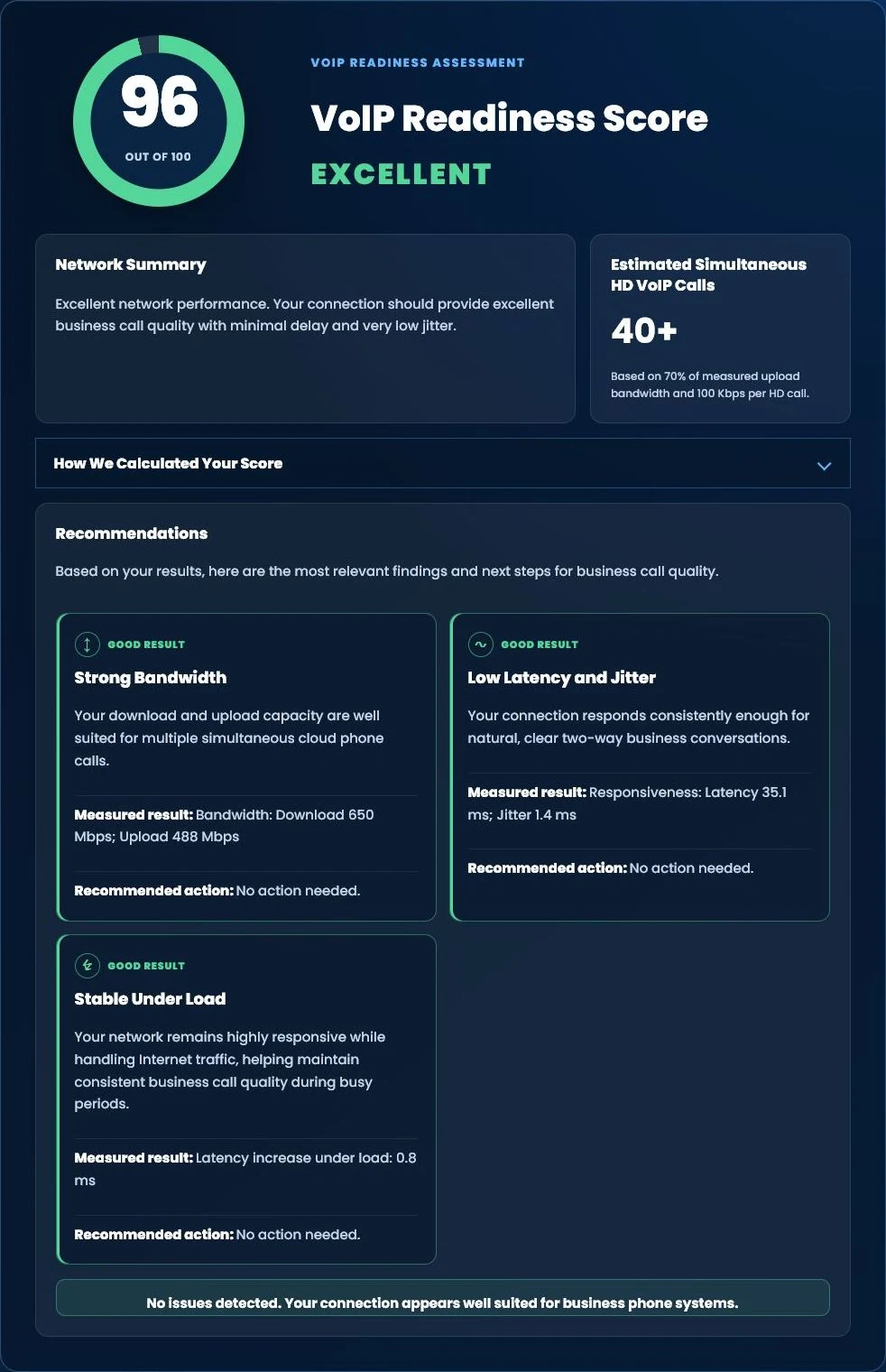
Run our free Tier 1 VoIP Readiness Assessment to measure latency, jitter, network responsiveness and overall VoIP readiness in about one minute.
- VoIP Readiness Score
- Latency & Jitter Analysis
- Network Stability Assessment
- Estimated HD Phone Capacity
FREE BUSINESS PHONE BILL REVIEW
Not Sure Which Features You Actually Need?
Tier 1 Telecom can review your current phone bill, users, numbers, equipment, call flow, features, and business requirements before recommending a new system. There is no obligation to switch. The goal is to understand the current environment and determine which capabilities would provide practical value.

























