
A modern business phone system is generally priced according to the number of users, phones, telephone numbers, features, and services a business needs.
Most cloud phone systems use a predictable monthly subscription rather than requiring a company to purchase and maintain a large phone server. However, the advertised monthly price is only one part of the total cost.
Price is only part of the decision. Use this practical checklist for choosing a business phone system provider to compare service, implementation, reliability, and accountability alongside the quote.
A complete quote may include:
- Monthly service for each user or extension
- Desk phones, cordless phones, conference phones, or headsets
- Business telephone numbers
- Toll-free numbers
- Calling usage
- Setup and implementation
- Number porting
- Optional features and integrations
- Taxes and regulatory fees
- Ongoing support
That is why two businesses with the same number of employees may receive very different quotes.
For a broader foundation, see Business Phone Systems: The Complete Guide or start with What Is a Business Phone System?
The Short Answer
Most modern business phone systems are priced per user or extension each month. The total monthly cost is usually calculated using a formula similar to this:
Number of users × monthly service price + optional services + taxes and fees
Equipment and implementation may be purchased upfront, financed, rented, or included as part of the service agreement, depending on the provider.
For example, if a provider charges $30 per user each month, the service portion of an illustrative quote would look like this:
| Number of users | Illustrative monthly service |
|---|---|
| 5 users | $150 per month |
| 10 users | $300 per month |
| 20 users | $600 per month |
| 30 users | $900 per month |
These examples are not universal prices or formal Tier 1 Telecom quotes. They simply demonstrate how per-user pricing works before equipment, optional services, taxes, and other charges are considered.
What Determines the Cost of a Business Phone System?
The number of employees is important, but it is not the only factor. A properly designed system should reflect how the business actually handles calls.
1. Users and Extensions
Each employee who needs an individual extension, voicemail box, direct number, mobile application, or desktop application may require a user license.
However, a business does not necessarily need one traditional outside phone line for every employee. Cloud systems can handle multiple simultaneous calls through the provider’s platform.
The better question is not simply, “How many employees do you have?” First determine how many phone lines and users you need based on actual calling roles and peak activity. Then ask:
How many people need to place, receive, transfer, or manage business calls?
A receptionist, remote employee, field technician, manager, and conference room may all require different configurations.
2. Desk Phones and Other Equipment
Some employees may need physical desk phones, while others may work primarily through a mobile application, computer application, or web phone.
Equipment costs may include:
- Standard IP desk phones
- Executive phones with larger displays
- Cordless phones
- Conference-room phones
- Receptionist expansion modules
- Headsets
- Paging equipment
- Analog telephone adapters
- Network switches or power equipment
Reusing compatible equipment can reduce upfront costs, but not every phone can be moved to a different provider. Compatibility, licensing, security, and provisioning requirements should be verified before assuming existing phones can be retained.
3. Business Telephone Numbers
A business may need more than one telephone number.
Additional costs can result from:
- Main business numbers
- Direct numbers for employees
- Department numbers
- Local numbers in additional markets
- Toll-free numbers
- Fax numbers
- Numbers used for business texting
- Tracking numbers used for advertising campaigns
Keeping your existing phone numbers is usually possible through a process called porting. The numbers should remain active with the existing carrier until the phone-system migration and number transfer have been completed.
4. Calling Usage
Many business phone plans include domestic calling, but providers may handle usage differently.
A quote should explain how the provider charges for:
- Domestic calls
- Toll-free usage
- International calling
- Conference calling
- Call-recording storage
- Fax usage
- Business texting
- Additional minutes or usage limits
A low advertised price may become less attractive if normal business activity regularly creates overage charges.
5. Features
Modern systems frequently include much more than dial tone and voicemail.
Common features may include:
- Auto attendants
- Call routing
- Ring groups
- Call queues
- Voicemail-to-email
- Voicemail transcription
- Mobile and desktop applications
- Business SMS and MMS
- Call recording
- Call analytics
- Call parking
- Simultaneous ring
- After-hours routing
- Remote-user support
Some providers include these capabilities in the standard monthly service. Others separate them into higher-priced plans or charge for individual add-ons.
Businesses should compare the features their business actually needs with the capabilities they will actually receive—not merely the starting price shown on a provider’s website.
What Costs Extra?
Optional services can significantly affect the final price of a business communications system.
AI Voice Agents
An AI voice agent can answer calls, collect information, schedule appointments, answer routine questions, transfer callers, and provide summaries to the business.
AI services are commonly priced according to factors such as included minutes, call volume, capabilities, integrations, and usage beyond the selected plan.
An AI agent can add to the monthly bill, but it may also reduce missed calls, after-hours voicemail, repetitive staff work, and lost opportunities.
Business Text Messaging
Business text messaging may require additional registration, telephone-number configuration, messaging plans, or usage charges.
Businesses planning to use SMS or MMS should also account for carrier-registration and consent requirements. Text messaging should be included in the original design rather than added as an afterthought.
Software Integrations
Integrations may connect the phone system to:
- Customer relationship management software
- Scheduling applications
- Help-desk systems
- Accounting platforms
- Microsoft 365
- Google Workspace
- Industry-specific business software
The cost may depend on the integration, the required connector, the number of users, and how much custom configuration is needed.
Call Center Features
Advanced queues, supervisor tools, agent reporting, call monitoring, screen pop, wallboards, and detailed analytics may require additional licensing.
A small office that only needs basic call routing should not be priced like a full contact center. Likewise, a high-volume customer-service department should not be placed on a basic plan that lacks the tools it needs.
Cloud Phone Systems Versus Traditional Phone Systems
A traditional on-premise system may require a substantial upfront investment in hardware, licensing, installation, wiring, and maintenance.
A cloud phone system moves much of that infrastructure to the provider’s platform. Businesses typically pay a recurring monthly fee and use internet-connected phones, mobile applications, or computer applications.
Cloud systems often provide:
- Lower initial equipment requirements
- More predictable monthly expenses
- Easier expansion
- Better support for remote employees
- Centralized updates
- Access to newer communication features
Continuity costs can also include backup internet, properly sized UPS equipment, network monitoring, and documented phone-system continuity planning.
An on-premise system may still make sense in certain environments, but businesses should compare the total cost over several years—not just the initial quote or monthly bill. For a fuller deployment comparison, read Cloud Phone Systems vs. Traditional Phone Systems.
One-Time Costs to Consider
In addition to monthly service, a new phone system may involve one-time expenses.
These can include:
- Purchasing or configuring phones
- Installing equipment
- Preparing the network
- Setting up call routing
- Recording greetings
- Building auto attendants
- Configuring users and voicemail
- Training employees
- Porting telephone numbers
- Removing or replacing older equipment
A provider should identify these costs before the project begins. A vague quote that says “setup included” may not explain whether the provider will design the call flow, configure every phone, coordinate the number transfer, train employees, and support the business during the transition. Understanding the installation timeline and preparation also helps distinguish genuine implementation work from a generic setup charge.
The Cheapest Quote Is Not Always the Lowest-Cost System
A phone system affects nearly every customer interaction. Choosing a provider based only on the lowest advertised price can create costs that never appear on the original quote.
These may include:
- Missed calls
- Poor call quality
- Unanswered support requests
- Limited routing options
- Unexpected feature charges
- Difficult number transfers
- Inadequate training
- Long contracts
- Paying employees to troubleshoot the system
- Replacing equipment that was selected incorrectly
Responsive support and proper system design have real financial value.
A slightly lower monthly payment may not be a bargain if employees struggle with the system or customers cannot reliably reach the business.
How to Compare Business Phone System Quotes
Every provider should quote the same general requirements. Otherwise, one proposal may appear less expensive simply because important items were omitted.
Before requesting quotes, create an inventory of:
- Employees who need phone access
- Physical phones and other devices
- Main and direct telephone numbers
- Departments and office locations
- Remote and mobile employees
- Current call-routing requirements
- Auto attendants and call queues
- Business-texting needs
- Fax requirements
- Recording requirements
- International calling
- Software integrations
- Expected growth
Then ask each provider to separate the proposal into:
- Monthly recurring service
- Equipment expenses
- One-time implementation charges
- Usage-based charges
- Optional services
- Taxes and regulatory fees
- Contract and cancellation terms
This makes it much easier to compare the true cost of each system.
A Better Way to Estimate Your Cost
The most accurate starting point is usually the company’s current telephone bill.
A detailed bill can reveal:
- Active lines
- Unused lines
- Telephone numbers
- Equipment charges
- Long-distance expenses
- Toll-free usage
- Taxes and fees
- Services the business may no longer need
It should then be compared with how the business wants calls to work today.
The new system should not merely reproduce an outdated configuration. It should solve current problems and support future growth.
Build a Quote-Ready Business Phone Brief
Keep the illustrative cost calculation above, then replace its assumptions with your own requirements. A useful estimate starts with the same brief for every provider.
| Input | What to write down | Why it changes the quote |
|---|---|---|
| People and calling roles | Reception, regular users, mobile staff, seasonal users and shared rooms | Separates user service from equipment and common-area needs. |
| Peak demand | Busy periods, overlapping inbound/outbound calls and overflow destinations | Checks capacity and call handling before selecting a license tier. |
| Numbers and devices | Numbers to retain; phones to reuse or replace | Identifies porting, compatibility and one-time equipment work. |
| Deployment and support | Locations, training, who makes changes and support expectations | Defines what implementation and ongoing management actually include. |
| Options and contract | Texting, AI, integrations, usage terms and renewal/cancellation conditions | Keeps optional work and recurring commitments visible. |
Mark each item as included, separately priced or still unconfirmed. Use the existing quote-comparison worksheet to compare the resulting proposals.
Questions to Ask Before Choosing a Provider
Before signing an agreement, ask:
- Is the service priced per user, per phone, per extension, or per location?
- Which features are included?
- Which features cost extra?
- Are mobile and desktop applications included?
- Is support included in the monthly service?
- Who configures the call routing?
- Are software updates included?
- Are there usage limits?
- What taxes and fees will appear on the bill?
- Is a long-term contract required?
- Can existing telephone numbers be retained?
- Who manages the number-transfer process?
- What happens if the internet goes down?
- How quickly can users or locations be added?
The answers are often more important than the advertised starting price.
When estimating total cost, confirm whether the current connection meets VoIP internet speed and network-quality requirements or whether network improvements should be included.
Frequently Asked Questions
What is the average cost of a small-business phone system?
There is no single average that applies to every business. Modern systems are commonly priced per user each month, with equipment, optional features, usage, taxes, and implementation affecting the final cost. A five-user office with simple routing will usually cost less than a five-user office requiring call queues, recording, integrations, texting, and AI call handling.
Does every employee need a separate phone line?
No. Cloud phone systems do not normally require a separate traditional outside line for every employee. Employees may have individual extensions or user accounts while the system handles multiple simultaneous calls through the provider’s platform.
Do I have to purchase new desk phones?
Not necessarily. Some employees can use mobile or computer applications, and certain existing IP phones may be reusable. Compatibility should be verified before the final quote is prepared.
Can I keep my current telephone numbers?
In most cases, existing telephone numbers can be transferred to the new provider. The current service should remain active until the port has been completed and verified.
Are taxes and fees included in the advertised price?
Not always. Ask the provider to identify taxes, regulatory charges, emergency-service fees, and other recurring costs separately so that you can compare the expected final bill.
Will adding employees increase the monthly cost?
Usually. A new employee who needs an extension, voicemail, applications, and calling access will generally require another user license. One benefit of a cloud system is that users can often be added without replacing the entire phone system.
Should I choose the provider with the lowest per-user price?
Not automatically. Compare included features, equipment, implementation, support, contract terms, reliability, and usage charges. The lowest advertised price may not represent the lowest total cost.
Get a Clear Business Phone System Estimate
A reliable estimate begins with understanding your users, telephone numbers, devices, call flow, features, and current expenses.
Tier 1 Telecom provides managed business phone systems for companies throughout Port St. Lucie and Florida’s Treasure Coast.
Bring us your current phone bill, and we will help identify what you are paying for, what you still need, and where a modern system may simplify your communications.
FREE BUSINESS RESOURCE
Test Your Internet for Business Phone Systems
Wondering whether your Internet connection is ready for cloud business phones?
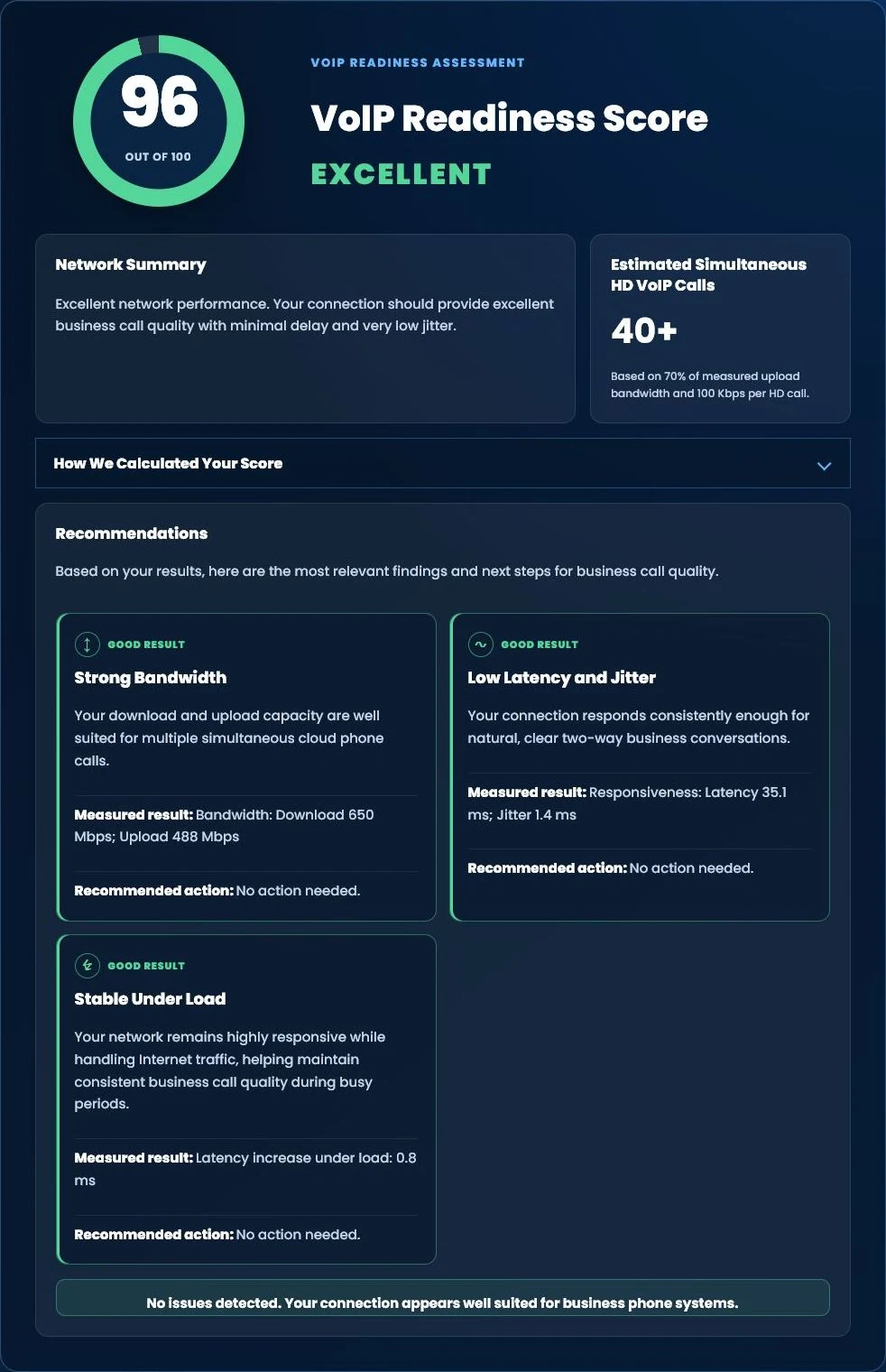
Run our free Tier 1 VoIP Readiness Assessment to measure latency, jitter, network responsiveness and overall VoIP readiness in about one minute.
- VoIP Readiness Score
- Latency & Jitter Analysis
- Network Stability Assessment
- Estimated HD Phone Capacity
Bring Us Your Current Bill
Not sure what your current provider is charging for? Tier 1 Telecom can review your existing phone bill, identify the services and fees you are paying for, and help you compare them with a properly designed modern phone system.

























