
Most businesses no longer need one traditional phone line for every employee.
A modern cloud phone system is normally designed around users, extensions, devices, phone numbers, and the number of calls happening at the same time. These elements are related, but they are not interchangeable.
For example, a company could have:
- One main published number
- Fifteen employees
- Twelve extensions
- Eight desk phones
- Five mobile-app users
- Four direct-dial numbers
- Six simultaneous conversations
That does not necessarily mean the business needs fifteen outside phone lines. The correct system size depends on who communicates with customers, how calls move through the organization, and how many people use the system simultaneously.
Capacity planning should also account for redundancy and internet failover for business phones so essential call paths remain practical during a connection failure.
For the broader foundation, read What Is a Business Phone System? and the complete Business Phone Systems guide.
The Short Answer
Most businesses need:
- One user or seat for each employee who regularly makes or receives business calls
- One extension for each user, department, shared device, or workflow requiring an internal destination
- One main business number
- Additional direct or department numbers only when they serve a practical purpose
- Enough simultaneous call capacity for the busiest part of the day
- Additional capacity where needed for queues, conferences, transfers, remote employees, and seasonal demand
- A reasonable buffer for unexpected volume
Employee count is a starting point, not the complete answer. A ten-person business might need only five active calling users. Another ten-person company may have all ten employees making and receiving calls throughout the day. A properly planned business phone system accounts for both people and actual calling activity.
What Does “Phone Line” Mean Today?
“Phone line” can refer to several different things. Every proposal should define its terminology so the business knows what is being licensed, billed, and limited.
Telephone number
A telephone number is what customers dial. It may be a main business number, department number, direct-dial number, toll-free number, fax number, or tracking or campaign number.
A telephone number does not necessarily equal one physical line or one employee. Multiple callers can often reach the same number simultaneously when the platform and service support it.
User or seat
A user or seat normally represents an employee’s account. Depending on the provider and plan, it may include an extension, voicemail, desk phone, mobile app, desktop app, calling permissions, queue membership, business-texting access, or reporting access.
Providers often base cloud-phone pricing on users or seats rather than physical lines, but practices vary.
Extension
An extension is an internal destination. It may belong to an employee, department, conference room, shared phone, voicemail box, queue, ring group, auto attendant, or AI voice agent.
Not every extension necessarily requires a separate paid user. That depends on the platform and its licensing rules.
Device
A device may be a desk phone, conference phone, cordless phone, mobile app, desktop softphone, or common-area phone. One user may have several devices, while several employees may share a common-area device.
Simultaneous call path
One simultaneous external conversation uses at least one active call path. If three employees are speaking to three outside callers, the business is using at least three simultaneous external conversations.
Transfers, conferences, forwarding, queues, recording, and automated workflows may affect capacity differently depending on the provider and platform.
Traditional Lines vs. Cloud Phone Users
Traditional systems were commonly planned around physical lines entering a building. If a business had four outside lines, it could generally handle four outside calls, with a fifth caller receiving a busy signal or another carrier-defined treatment.
Modern cloud phone systems can connect desk phones, mobile employees, remote users, desktop apps, multiple locations, queues, auto attendants, and AI voice agents. Calls are not necessarily tied to one physical handset or copper line.
Cloud Phone Systems vs. Traditional Phone Systems explains the broader architectural differences.
Start With the People Who Use the System
Inventory employee roles before counting licenses. For each person, determine whether the employee needs to make outbound calls, receive direct calls, answer a queue, use voicemail, work remotely, use mobile or desktop applications, send business text messages, participate in recorded calls, access reports, or manage the system.
This user and device inventory becomes part of installation planning, because licenses, endpoints, permissions, queues, and training must be prepared before launch.
Employees who regularly handle calls
Receptionists, salespeople, customer-service employees, dispatchers, office managers, and executives often need full user accounts because calling is part of their daily role.
Occasional users
An occasional user may be supported through a shared phone, common-area device, or limited configuration. Do not assume every platform licenses these arrangements the same way; confirm how the provider treats the user and device.
Mobile and remote employees
Remote employees may use supported mobile or desktop applications connected to the same business identity rather than requiring separate traditional lines.
Shared spaces
Conference rooms, reception areas, warehouses, break rooms, and other common areas may need a shared device without being assigned to one employee. Emergency calling information and location configuration still require careful attention.
Determine How Many Calls Happen at the Same Time
The busiest fifteen or thirty minutes can matter more than the total number of calls during the day. One business might receive many calls but rarely have more than three simultaneous conversations. Another may have fewer total calls but experience a concentrated morning rush.
Review inbound activity
Review main-number calls, direct-dial calls, queue traffic, reception transfers, after-hours activity, seasonal peaks, marketing-driven spikes, and combined multi-location traffic.
Review outbound activity
Include calls to customers, prospects, vendors, insurers, government agencies, patients, clients, field employees, and other locations. Outbound calling can overlap with the busiest inbound period.
Include overlapping conversations
If a receptionist handles one inbound call while three employees call customers and two service representatives speak with callers from a queue, the business has six simultaneous external conversations.
A Practical Capacity Formula
As a planning estimate, begin with:
Peak simultaneous inbound calls + peak simultaneous outbound calls + a reasonable buffer
Suppose call reports show four simultaneous inbound calls and two simultaneous outbound calls, with occasional transfers or conferencing. The observed peak is approximately six simultaneous conversations. The provider should then evaluate additional capacity for busy periods, growth, transfers, forwarded calls, and unusual demand.
This is a planning method, not a universal licensing formula. Some cloud providers package or manage calling capacity differently, and some do not present it as a fixed number of call paths. Confirm the provider’s actual policy.
Do You Need One Number Per Employee?
Most businesses do not need one telephone number for every employee. A common configuration includes one main published number, an auto attendant or receptionist, internal extensions, department queues, and a limited number of direct-dial numbers.
Before finalizing the design, identify which existing business numbers should be ported, retired, or assigned to a specific workflow.
When direct numbers are useful
Direct numbers may serve executives, salespeople, account managers, attorneys or other professionals, department leaders, employees who receive frequent direct calls, and specialized service teams.
When an extension may be enough
An extension may be sufficient when most callers use the main number, reception transfers calls, the auto attendant provides directory access, the employee rarely receives outside calls, or the employee primarily works inside a department or queue.
Direct numbers should solve a communication problem rather than merely match employee count.
Call Queues Can Change the Capacity Requirement
Queues allow several customers to call one number or department while employees handle calls in an organized sequence. Depending on the platform, routing may consider availability, ring order, longest-idle employee, skill or department, schedule, location, or overflow rules.
Queues can reduce busy signals, but they do not remove the need for capacity planning. Decide how long callers should wait, what they hear, when calls overflow, whether callbacks are available, where calls go when nobody is available, and what happens after hours. These choices are part of the broader set of business phone system features.
Consider Conference Calls and Transfers
Capacity planning may need to consider adding participants to a conference, transferring callers to outside numbers, forwarding to mobile phones, bridging locations, recorded conference lines, interpreters, outside specialists, and third-party services.
The effect depends on how the platform manages each call leg. Ask the provider to explain the treatment in plain language.
Different Businesses Need Different Configurations
The following are planning illustrations, not universal recommendations.
| Business example | Possible users and devices | Calling considerations |
|---|---|---|
| Two-person professional office | Two users, two desk phones or apps, one main number | Usually lower simultaneous-call demand, but backup routing is still needed when both people are busy |
| Ten-person office | Individual users for customer-facing employees and shared devices for common areas | Reception, direct calls, transfers, voicemail, and several overlapping conversations |
| Twenty-five-person service company | Office users, dispatchers, mobile employees, and shared warehouse phones | Inbound service calls, outbound scheduling, apps, queues, on-call routing, and seasonal spikes |
| Medical or legal office | Front-desk users, professionals, shared departments, and appropriate direct numbers | High inbound demand, queues, appointment calls, privacy requirements, and defined after-hours routing |
| Multi-location business | Users across multiple offices with centralized administration | Shared main numbers, location-specific numbers, internal extension dialing, alternate routing, and combined peak demand |
Plan for Growth Without Overbuying
Consider additional employees, new locations, seasonal workers, temporary users, additional direct numbers, new queues, mobile employees, higher call volume, integrations, and optional AI voice agents.
Cloud platforms can often add users and capabilities without replacing a physical PBX, but scalability, pricing, administration, and provider policies still require review. Hosted PBX vs. On-Premise PBX explains how platform location affects expansion and management.
Do Not Treat Specialty Services Like Ordinary Phone Users
Fax machines, alarm panels, elevator phones, gate systems, fire panels, point-of-sale equipment, modems, paging systems, and emergency or safety devices may have technical, regulatory, monitoring, power, safety, or reliability requirements that differ from normal voice calling.
Do not cancel or replace a specialty line until its purpose, equipment, provider, and requirements have been documented.
Some specialty services may remain on a dedicated carrier connection after the main phone system moves to the cloud. An ordinary VoIP adapter is not always an acceptable replacement.
How Phone-System Size Affects Cost
Pricing may be affected by users, devices, phone models, direct numbers, toll-free numbers, features, recording, business texting, contact-center tools, integrations, support, simultaneous-call policies, setup, and training.
Buying too much wastes money. Inadequate capacity can lead to unavailable features, failed calls, overloaded queues, or an immediate redesign. How Much Does a Business Phone System Cost? provides a broader pricing framework.
Review Real Call Data When Available
The best estimate uses actual data: calls by hour, peak simultaneous calls, call duration, missed calls, busy calls, abandoned calls, queue traffic, inbound and outbound volume, and calls by number or department.
The current bill may identify numbers, recurring line charges, toll-free services, equipment, specialty services, and features. It may not reveal personal-cellphone use, queue abandonment, missed demand, or poor routing. Combine billing information with employee interviews and call reports.
Turn Your Capacity Estimate Into a Provider Brief
Use the formula and business examples above as a starting point, then ask the provider to show how the proposed configuration handles your actual busy period.
| Record | Include |
|---|---|
| Users and shared devices | Regular callers, mobile/remote staff, temporary users and shared rooms; keep these counts separate. |
| Telephone numbers | Main, direct, toll-free and location-specific numbers; identify which must be retained. |
| Concurrent call demand | Observed peak inbound and outbound calls, busy periods and a documented planning buffer. |
| Waiting and transfer behavior | Queues, unanswered calls, transfers, conferences and the destination when everyone is busy. |
| Proposal assumptions | What is included, what is limited, how growth is added and how each item is charged. |
Ask for an explanation of the capacity limits and billing model that apply to this proposal. Do not assume a user count, phone count or number count automatically describes how many conversations the service supports.
Questions to Ask a Phone-System Provider
- Is pricing based on users, devices, numbers, or call paths?
- How many simultaneous external calls are supported?
- Can multiple callers reach our main number at the same time?
- Do waiting callers in a queue affect calling capacity?
- How are external transfers and forwarded calls counted?
- Does each employee need a full user license?
- Can one user use a desk phone, mobile app, and desktop application?
- Are shared and common-area phones licensed differently?
- Can users and capacity be added later?
- Are direct-dial numbers included or billed separately?
- What happens when available call capacity is reached?
- Are there usage limits or acceptable-use policies?
- How should fax, alarms, elevators, gates, and specialty services be handled?
- Which reports can verify peak calling activity?
The provider should answer these questions in understandable language and identify any policy that may affect pricing or call handling.
Once you estimate concurrent call volume, use that number to calculate the internet speed and network capacity VoIP requires.
Frequently Asked Questions
Does every employee need a separate phone line?
No. Modern cloud phone systems are generally designed around users, extensions, devices, and simultaneous calls. Employees may share a main number while using individual extensions or applications.
Can several customers call the same business number at once?
Yes, when the service and phone system are configured to support multiple simultaneous calls. Callers may reach employees, an auto attendant, a queue, voicemail, or another approved destination.
What is the difference between a phone number and a phone line?
A phone number is the address customers dial. A line or call path generally represents the capacity to carry a conversation. One number can often support multiple simultaneous calls.
What happens if too many people call at once?
The result depends on the provider and configuration. Additional callers might enter a queue, reach voicemail, follow overflow routing, receive a busy treatment, or fail to connect if available capacity has been exhausted.
Do mobile and desktop applications count as additional lines?
Not necessarily. A mobile or desktop application may be another device associated with an existing user. Licensing and simultaneous-call rules vary by provider and platform.
Do fax machines, alarms, or elevator phones need separate lines?
They may. Specialty equipment can have technical, safety, monitoring, power, or regulatory requirements that make ordinary VoIP replacement inappropriate. Each service should be evaluated separately before cancellation or migration.
How can I determine our peak simultaneous call usage?
Review call-detail records, queue reports, hourly call volume, current-provider data, and employee workflows. If detailed reports are unavailable, a phone bill and structured discussion can still provide a useful starting point.
Size the System Around Real Communication
The correct system accounts for:
- Employees who regularly use the system
- Shared and common-area devices
- Mobile and remote workers
- Main and direct numbers
- Inbound and outbound activity
- Peak simultaneous conversations
- Queues, transfers, and conferences
- Multiple locations
- Specialty services
- Expected growth
A properly sized system gives customers a reliable way to reach the business without forcing the company to pay for unnecessary users, devices, numbers, or capacity.
FREE BUSINESS RESOURCE
Test Your Internet for Business Phone Systems
Wondering whether your Internet connection is ready for cloud business phones?
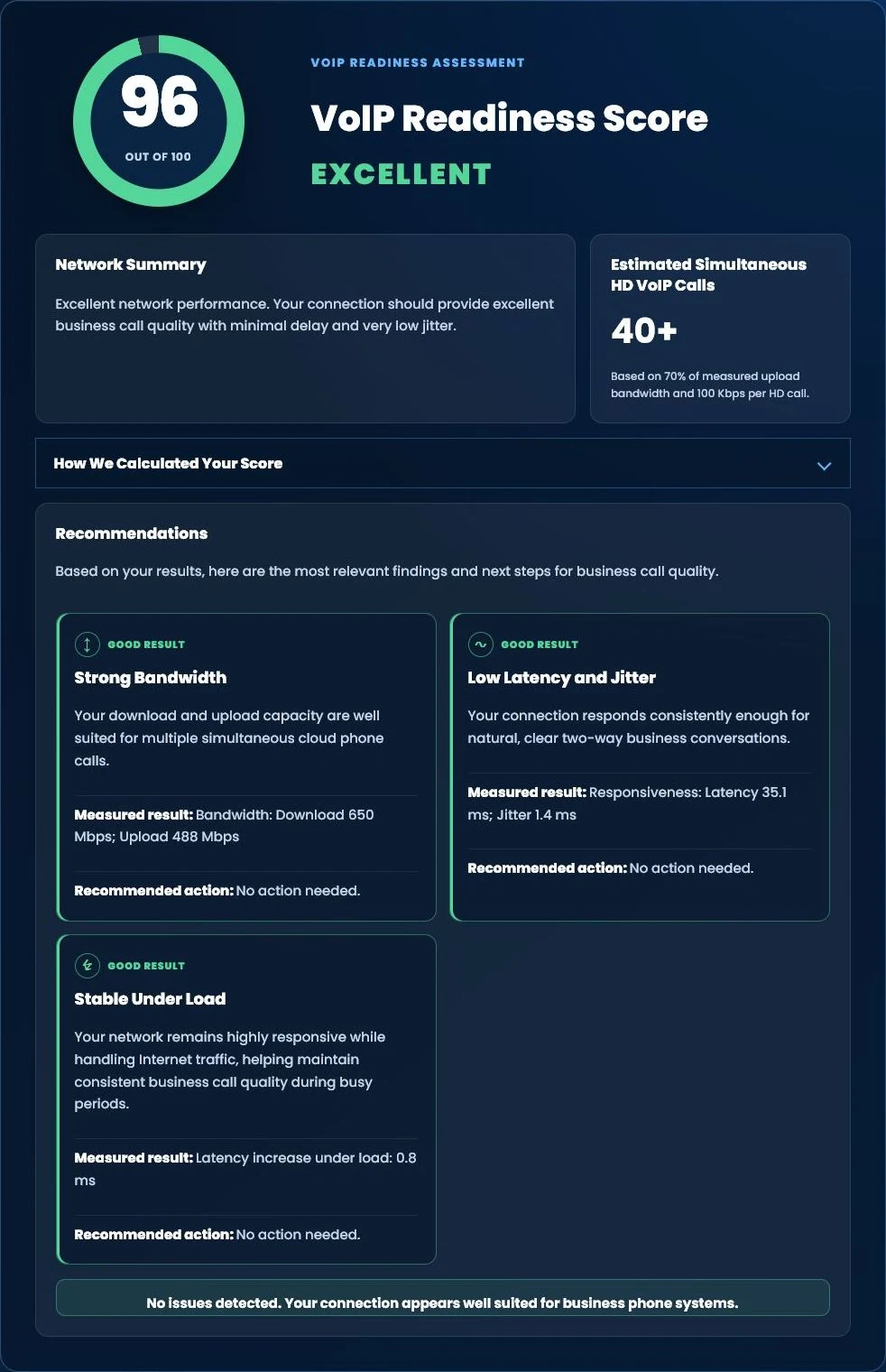
Run our free Tier 1 VoIP Readiness Assessment to measure latency, jitter, network responsiveness and overall VoIP readiness in about one minute.
- VoIP Readiness Score
- Latency & Jitter Analysis
- Network Stability Assessment
- Estimated HD Phone Capacity
BUSINESS PHONE CAPACITY REVIEW
Not Sure How Many Lines or Users You Need?
Tier 1 Telecom can review your telephone bill, active numbers, users, equipment, features, calling workflow, and known growth plans before recommending a new configuration. There is no obligation to switch.

























