
A PBX, or private branch exchange, is the system that manages a company’s internal extensions, incoming calls, outgoing calls, transfers, voicemail, call routing, and other telephone features.
The primary difference between hosted PBX and on-premise PBX is where that system operates and who is responsible for maintaining it.
Once you choose an architecture, use this practical provider-selection checklist to compare planning, support, pricing, security, and migration responsibilities.
With a hosted PBX, the core phone system operates in the provider’s cloud platform. The business connects through IP phones, mobile applications, desktop applications, and an internet connection.
That design separates cloud call control from the office, but local devices still depend on connectivity; review hosted PBX outage behavior and survivability options when comparing architectures.
With an on-premise PBX, the business owns or leases phone-system hardware installed at its office. The company or its IT provider is responsible for maintaining, securing, updating, and eventually replacing that equipment.
Both approaches can provide professional business phone systems. The better option depends on the company’s size, locations, internal IT resources, budget, reliability requirements, existing equipment, and desired level of control.
The Short Answer
For most small and midsize businesses, a hosted PBX provides the easier path to modern features, remote work, predictable monthly expenses, and future expansion.
An on-premise PBX may still be appropriate for organizations that have:
- Dedicated telecommunications or IT staff
- Highly specialized integrations
- Existing PBX infrastructure
- Unusual internal-calling requirements
- Strict control requirements
- A strong reason to keep call-processing hardware inside the building
The decision should not be based solely on whether one system is “cloud” and the other is “physical.” It should be based on which organization is best equipped to operate, protect, update, and support the phone system throughout its useful life. For the broader architecture comparison, see Cloud Phone Systems vs. Traditional Phone Systems.
Project planning should also compare cloud and on-premise installation requirements, including local hardware, network preparation, configuration, testing, and cutover dependencies.
Hosted PBX vs. On-Premise PBX at a Glance
| Consideration | Hosted PBX | On-Premise PBX |
|---|---|---|
| Core system location | Provider’s cloud platform | Equipment at the business |
| Typical cost structure | Monthly per-user service | Larger upfront investment plus maintenance |
| System maintenance | Primarily handled by provider | Handled by business or IT vendor |
| Software updates | Usually managed centrally | Must be planned and installed |
| Adding users | Usually quick and scalable | May require licenses, hardware, or capacity upgrades |
| Remote employees | Built into most modern platforms | May require additional configuration |
| Multiple locations | Managed through one cloud platform | May require connected systems or additional equipment |
| Business continuity | Calls can often be rerouted away from the office | Depends heavily on local equipment, power, and carrier connectivity |
| Custom control | Provider controls the core platform | Business has greater direct control |
| Internal expertise | Less PBX expertise normally required | Technical expertise is usually required |
| Hardware lifecycle | Provider manages core platform lifecycle | Business replaces aging PBX equipment |
| Upfront expense | Generally lower | Generally higher |
This table provides a broad comparison. The exact result depends on the provider, equipment, network, configuration, contract, and support arrangement.
What Is a Hosted PBX?
A hosted PBX is a business phone system in which the central call-processing platform is operated by a service provider rather than installed at the customer’s office.
The provider maintains the core system, while the business uses connected devices such as:
- IP desk phones
- Cordless IP phones
- Conference phones
- Mobile applications
- Desktop applications
- Web phones
- Analog adapters
- Paging devices
When someone calls the business, the hosted platform determines what should happen next. It may send the call to an auto attendant, ring group, call queue, employee extension, mobile application, voicemail box, or AI voice agent.
A hosted PBX is commonly delivered as part of a cloud phone system or managed business VoIP service.
What Is an On-Premise PBX?
An on-premise PBX places the central phone-system hardware at the business’s location.
Depending on the age and design of the system, that equipment may include:
- A physical PBX appliance
- A local server
- Proprietary control units
- Interface cards
- Voicemail hardware
- Licensing servers
- PRI or analog telephone connections
- SIP trunks
- Network switches
- Battery backups
- Cabling and patch panels
The business owns or leases the equipment and is responsible for keeping it operational.
That responsibility may fall to an internal IT department, a telecommunications contractor, or a managed service provider. Tasks can include installing updates, replacing failed parts, managing licenses, securing remote access, backing up configurations, maintaining carrier connections, and planning eventual replacement.
An on-premise system does not necessarily mean an old analog phone system. A modern on-premise IP PBX can still use VoIP phones and SIP trunks while keeping its primary call-processing server inside the business.
Cost Differences
The cost comparison between hosted and on-premise PBX systems involves more than the initial purchase price or monthly payment. Migration costs may also include the work required to port existing business numbers securely and without interrupting service.
Hosted PBX Costs
A hosted system commonly includes:
- Monthly service for each user or extension
- Desk phones or other devices
- Setup and implementation
- Business telephone numbers
- Usage-based services
- Optional features
- Integrations
- Taxes and regulatory fees
The monthly subscription normally includes access to the provider’s core platform, updates, and standard system maintenance.
This creates a more predictable operating expense, although the total monthly cost can increase as the business adds users, numbers, advanced features, or additional usage.
On-Premise PBX Costs
An on-premise system may require:
- PBX server or appliance
- Software licenses
- User or extension licenses
- Voicemail licensing
- Carrier-interface equipment
- Installation
- Network preparation
- Battery backup
- Support agreements
- Software upgrades
- Replacement parts
- Internal IT labor
- Emergency service calls
- Hardware replacement at the end of its useful life
An on-premise PBX may not carry the same per-user cloud subscription, but it creates ownership and maintenance responsibilities that should be included in the long-term cost.
The proper comparison is the total cost of ownership over several years, not simply the first invoice.
For a deeper look at the expenses that affect either design, see How Much Does a Business Phone System Cost?
Maintenance and Technical Responsibility
Maintenance is one of the clearest differences between the two models.
With Hosted PBX
The provider is generally responsible for:
- Maintaining the central platform
- Installing core software updates
- Managing platform capacity
- Replacing central infrastructure
- Monitoring the hosted environment
- Maintaining platform-level redundancy
- Supporting system features
The business and its IT provider are still responsible for the local network, internet connection, phones, user credentials, and proper device configuration.
Hosted does not mean maintenance-free. It means that responsibility for the central PBX platform moves from the customer to the provider.
With On-Premise PBX
The business or its technical vendor must manage:
- PBX software and firmware
- Security patches
- System backups
- Hardware health
- Replacement parts
- Licensing
- Remote access
- Carrier connections
- System capacity
- Disaster recovery
- Vendor support agreements
This can provide greater direct control, but it also requires someone with the knowledge and authority to manage the system correctly.
Scalability
A hosted PBX is usually easier to expand.
Adding an employee may involve creating a user, assigning an extension, configuring permissions, and connecting a phone or application. The core hosted platform does not normally need to be replaced because one additional person joined the company.
Accurate expansion starts with planning users and simultaneous calls, not simply matching one outside line to each employee.
This can be especially useful for:
- Growing businesses
- Seasonal staffing
- Remote employees
- Multiple offices
- Temporary locations
- Hybrid work
- Employees who travel
- Companies adding departments or call queues
An on-premise PBX may also be expandable, but growth can depend on available licenses, ports, server resources, cards, storage, and supported hardware.
A system purchased for 20 users may require additional licensing or physical upgrades when the company grows beyond its original design.
Remote Employees and Multiple Locations
Hosted PBX systems are generally designed to treat users as part of the same company phone system regardless of where they work.
Employees may be able to use:
- The same extension at home or in the office
- A mobile application
- A computer-based phone
- Company caller ID
- Extension-to-extension dialing
- Call transfers
- Shared ring groups
- Centralized voicemail
- Unified reporting
Multiple locations can often share one auto attendant, numbering plan, directory, call queue, and administration portal.
An on-premise PBX can support remote workers and connected offices, but doing so may require VPNs, session border controllers, additional security, private network connections, or separate PBX equipment.
The complexity depends on the system and how it was originally designed.
Reliability and Business Continuity
Neither hosted nor on-premise PBX is automatically immune to outages. The risks are simply located in different places.
Hosted PBX Continuity
A hosted PBX does not depend on a PBX server remaining operational inside the customer’s building.
If an office loses power or internet access, a properly configured system may still be able to:
- Send calls to mobile applications using cellular data
- Route calls to another office
- Forward calls to outside numbers
- Send callers to voicemail
- Continue operating auto attendants
- Redirect calls to remote employees
- Use alternate internet connections
The provider’s cloud platform must still be operational, and office desk phones need power and network access. Business continuity depends on proper planning rather than the word “cloud” by itself.
On-Premise PBX Continuity
An on-premise PBX may continue providing internal extension dialing during some internet outages because the call-processing equipment is inside the building.
However, outside calling may still depend on:
- SIP trunks
- Internet connectivity
- PRI circuits
- Analog lines
- Local carrier service
- Electrical power
- Battery backup
- The PBX hardware itself
If the building loses power, becomes inaccessible, or suffers equipment damage, the phone system may be unavailable unless a separate failover plan exists.
For Treasure Coast businesses preparing for hurricanes, power interruptions, and office closures, the continuity plan matters as much as the type of PBX.
Internet Requirements
Hosted PBX desk phones require a reliable network and internet connection to reach the provider’s platform.
Businesses should evaluate:
- Available bandwidth
- Latency
- Packet loss
- Jitter
- Router and firewall configuration
- Network-switch capacity
- Power over Ethernet
- Quality-of-service settings
- Backup internet options
- Cellular failover
- Battery backup
An on-premise PBX may keep some local functions operating without internet access, but many modern on-premise systems still use SIP trunks for outside calling. In those cases, an internet or carrier outage can still interrupt external calls.
Choosing an on-premise system solely to avoid internet dependence may not accomplish that goal unless the complete carrier and failover design supports it.
Features and Updates
Hosted platforms generally make newer business phone system features available without requiring the customer to replace the core PBX.
Depending on the provider and plan, these features may include:
- Auto attendants
- Call queues
- Ring groups
- Mobile and desktop applications
- Voicemail-to-email
- Voicemail transcription
- Business text messaging
- Call recording
- Call analytics
- Call routing
- Presence
- Web phones
- CRM integrations
- AI voice agents
An on-premise PBX may support many of the same capabilities. However, adding them may require new licenses, software upgrades, server capacity, additional hardware, or third-party systems.
Businesses should verify what is included rather than assuming every hosted or on-premise platform provides the same features.
Security
Security responsibilities exist with both approaches.
Hosted PBX Security
The provider generally manages the security of the core platform, including platform updates, infrastructure, and data-center controls.
The customer must still protect:
- User passwords
- Administrator accounts
- Mobile devices
- Computers
- Local networks
- Email accounts
- Call-forwarding rules
- Employee access
- Departing-user accounts
A secure hosted platform can still be exposed by weak credentials or poor account management.
On-Premise PBX Security
With an on-premise PBX, more responsibility belongs directly to the business.
That can include:
- Installing security updates
- Protecting remote administration
- Restricting international calling
- Monitoring for toll fraud
- Securing SIP trunks
- Managing firewall rules
- Removing former employees
- Protecting backups
- Replacing unsupported equipment
Greater control can be valuable, but control only improves security when the organization has the resources to manage it properly.
Control and Customization
An on-premise PBX may offer more direct access to system settings, hardware, databases, call routing, and custom integrations.
That can be important for an organization with:
- Specialized internal applications
- Proprietary workflows
- Complex dialing requirements
- Dedicated telecommunications engineers
- Regulatory or operational reasons to retain local control
A hosted provider controls the underlying platform and determines which features, integrations, devices, and customizations are supported.
For most small businesses, that tradeoff simplifies management. For an organization with highly specialized needs, it may feel restrictive.
The right question is whether the business will actually use and maintain the additional control an on-premise system provides.
Which Businesses Are Usually Better Suited to Hosted PBX?
Hosted PBX is often the better fit for organizations that:
- Want predictable monthly expenses
- Do not employ a PBX specialist
- Have remote or mobile employees
- Operate more than one location
- Expect to add or remove users
- Want modern applications and features
- Prefer provider-managed updates
- Need flexible call routing
- Want to reduce onsite equipment
- Need easier business-continuity options
This includes many professional offices, contractors, medical practices, law firms, property-management companies, retail operations, and service businesses.
When Might On-Premise PBX Make Sense?
An on-premise PBX may be appropriate when the organization:
- Has a capable internal telecommunications team
- Requires specialized customization
- Already owns a supported system with remaining useful life
- Has unusual internal-dialing requirements
- Needs direct control over the platform
- Has facilities designed to protect and power the equipment
- Can maintain backup hardware and carrier connectivity
- Has evaluated the full long-term ownership cost
Existing investment matters. A business with a properly maintained on-premise system should not replace it solely because hosted systems are newer.
The decision should be based on business requirements, risk, supportability, and future plans.
Questions to Ask Before Choosing
Before selecting either model, ask:
- Where will the central PBX operate?
- Who maintains and updates it?
- Who replaces failed hardware?
- What happens when the office loses internet?
- What happens when the office loses power?
- Can calls be redirected to another location?
- How are remote employees supported?
- What equipment must be purchased?
- Which features are included?
- Which features require additional licenses?
- How are telephone numbers transferred?
- How are backups handled?
- What security responsibilities belong to the business?
- What happens when the system reaches end of life?
- How quickly can users and locations be added?
- Is a long-term contract required?
- What support is included?
A provider should be able to answer these questions clearly before recommending a system. Plan any phone system migration and number transfer before disconnecting the current service.
Hosted PBX or On-Premise PBX: Which Is Better?
Neither approach is universally better.
An on-premise PBX provides direct ownership and control, but it also places hardware, maintenance, security, upgrades, redundancy, and replacement planning on the business.
A hosted PBX moves the core system to the provider’s platform, making it easier for many organizations to add users, connect multiple locations, support remote employees, and access modern communications features.
For most small and midsize businesses without dedicated telecommunications staff, hosted PBX is usually the more practical choice.
The final recommendation should still be based on the company’s actual call flow, network, locations, employees, continuity requirements, current equipment, and budget.
Hosted PBX performance also depends on the connection, so evaluate the bandwidth and network quality VoIP requires before deployment.
Frequently Asked Questions
Is hosted PBX the same as VoIP?
Hosted PBX normally uses VoIP to carry calls between the provider’s platform and the customer’s phones or applications. VoIP describes how voice traffic is transmitted, while hosted PBX describes where the central phone system operates and who manages it.
Is hosted PBX the same as a cloud phone system?
The terms are often used interchangeably. A hosted PBX is generally one type of cloud phone system in which the provider operates the central call-control platform.
Will an on-premise PBX work if the internet goes down?
Some internal calling may continue because the PBX is located inside the building. Outside calls may still fail if the system uses internet-based SIP trunks. The result depends on the carrier connection, local power, equipment, and failover configuration.
Will hosted PBX phones work during an internet outage?
Office desk phones normally need internet access to reach the hosted platform. However, calls may be redirected to mobile phones, remote users, another office, voicemail, or an alternate connection when continuity features are configured in advance.
Is hosted PBX less expensive?
Hosted PBX often requires less upfront equipment, while on-premise PBX may require a larger initial investment. Long-term cost depends on users, devices, licenses, maintenance, support, upgrades, features, and equipment replacement.
Is an on-premise PBX more secure?
Not automatically. It provides the business with greater control, but the business must properly patch, monitor, protect, back up, and maintain the system. Security depends on the platform, configuration, provider, local network, and account-management practices.
Can existing telephone numbers be retained?
In most cases, existing business numbers can be transferred to either type of system. The current service should remain active until the number-porting process has been completed and verified.
Can existing desk phones be reused?
Possibly. Reuse depends on the phone manufacturer, model, firmware, licensing, provider compatibility, and whether the phones can be securely reprovisioned.
Get Help Choosing the Right PBX
Choosing between hosted and on-premise PBX should begin with an evaluation of your users, locations, network, telephone numbers, call routing, current equipment, support resources, and continuity requirements.
Tier 1 Telecom provides managed business phone systems for companies in Port St. Lucie and throughout Florida’s Treasure Coast.
We can review your current phone system and bill, explain which services you are paying for, and help determine whether moving to a hosted platform makes sense for your business.
FREE BUSINESS RESOURCE
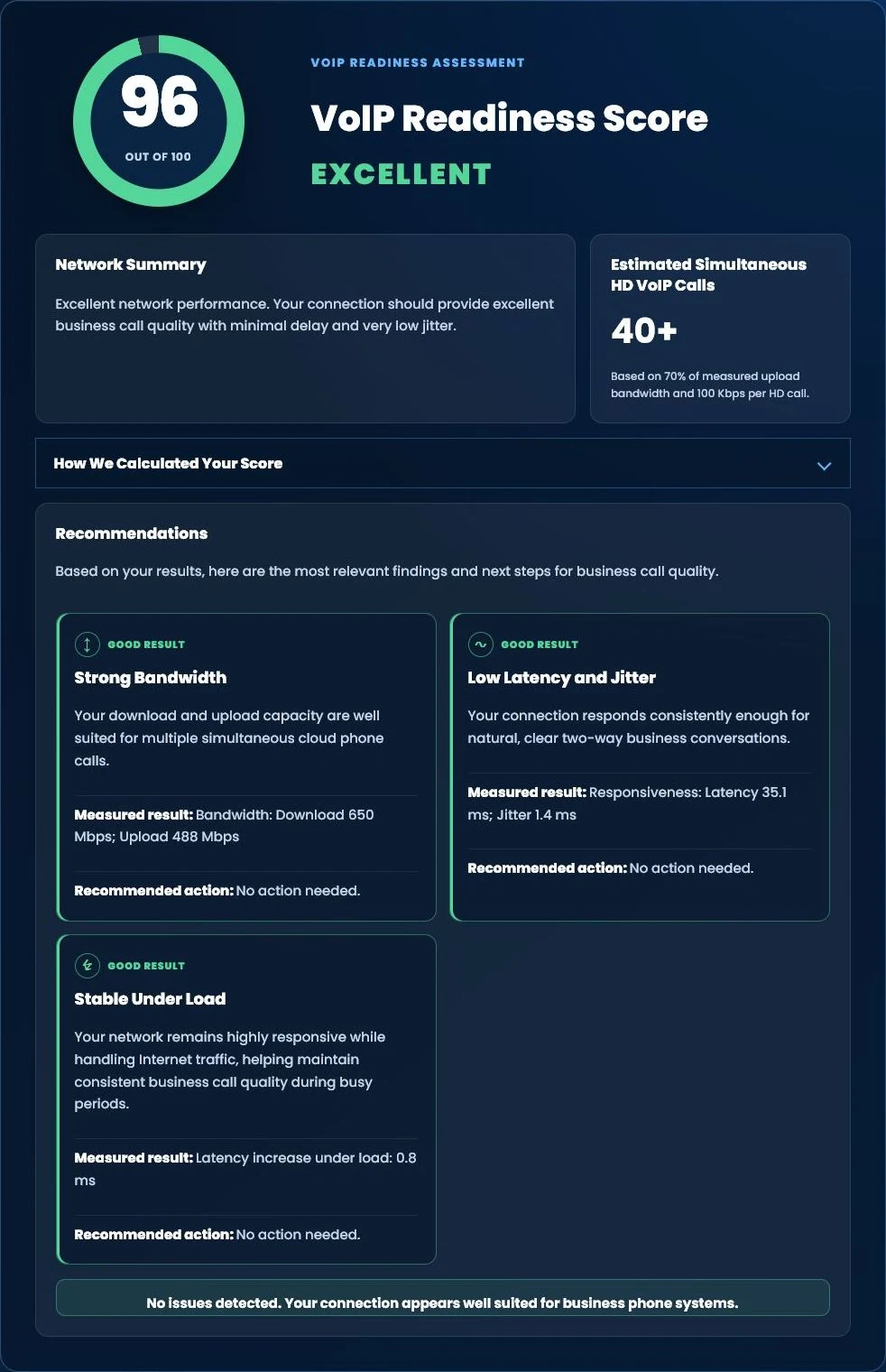
Test Your Internet for Business Phone Systems
Wondering whether your Internet connection is ready for cloud business phones?
Run our free Tier 1 VoIP Readiness Assessment to measure latency, jitter, network responsiveness and overall VoIP readiness in about one minute.
- VoIP Readiness Score
- Latency & Jitter Analysis
- Network Stability Assessment
- Estimated HD Phone Capacity
Get a Free Phone System Review
Not sure whether your current system should be replaced, upgraded, or moved to the cloud? Tier 1 Telecom can review your existing phone system, current bill, users, numbers, call flow, and continuity requirements.

























