
A business can have a fast internet plan and still experience choppy, delayed or robotic phone calls.
That surprises people because internet performance is usually described with two numbers: download speed and upload speed. Those numbers matter, but they do not tell you whether voice packets are arriving on time, in the correct order and consistently enough to produce a natural conversation.
VoIP call quality depends heavily on four network conditions:
- Latency: how long a packet takes to travel between endpoints.
- Jitter: how much that travel time varies from one packet to the next.
- Packet loss: how many packets never arrive in time to be used.
- Quality of Service, or QoS: how the network prioritizes time-sensitive voice traffic when the connection is busy.
When these conditions are healthy, a cloud phone call can sound clear and immediate. When they are not, adding more advertised bandwidth may not solve the problem.
This guide explains what the measurements mean, what results a business should aim for and how to narrow down the actual cause of poor calls.
The Short Version: What Good VoIP Performance Looks Like
There is no single number that guarantees a perfect call across every carrier, codec, device and network path. However, these are useful business-network screening targets:
One-way latency
- Strong target
- Under 150 ms
- Investigate
- 150–300 ms
- Likely to affect calls
- Above 300 ms
Round-trip latency
- Strong target
- Under 300 ms
- Investigate
- 300–500 ms
- Likely to affect calls
- Above 500 ms
Jitter
- Strong target
- Under 30 ms
- Investigate
- 30–50 ms
- Likely to affect calls
- Above 50 ms
Packet loss
- Strong target
- Under 1%
- Investigate
- 1–3%
- Likely to affect calls
- Above 3%
Zero packet loss is ideal. Lower latency and jitter are always better.
These ranges are diagnostic guidelines, not a promise that every result inside the table will sound perfect. A connection can average 20 milliseconds of jitter while experiencing short bursts that ruin calls. It can also pass a morning test and fail every afternoon when cloud backups, cameras or large uploads become active.
The International Telecommunication Union’s G.114 guidance treats up to 150 milliseconds of one-way transmission time as acceptable for most voice applications. Cisco’s voice-quality guidance similarly emphasizes low delay, minimal jitter and packet loss well below 1% for high-quality VoIP.
The pattern matters as much as the average.
For a focused explanation, learn how to interpret a good jitter score for VoIP.
For a focused latency reference, learn how to understand acceptable latency for VoIP.
How a VoIP Call Travels Across the Network
During a VoIP call, your voice is converted into small digital packets. Those packets travel through the phone or application, the local network, the router or firewall, the internet connection, one or more carrier networks and the receiving endpoint.
The process happens continuously and in real time.
Email and file downloads are forgiving. If one part arrives late, the device can wait or request it again. A live conversation cannot pause for several seconds while missing audio is retransmitted. By the time a severely delayed voice packet arrives, the conversation has already moved on.
Phones and applications use a small jitter buffer to smooth modest variations in arrival time. That buffer can briefly hold packets and play them in the correct rhythm. It cannot compensate for unlimited delay or loss. Making the buffer too large would create a different problem: an unnatural conversational delay.
That is why VoIP needs consistency, not merely capacity.
What Is Latency?
Latency is the time required for data to travel from one point to another. It is measured in milliseconds.
A network test may report:
- One-way latency: the time from the sender to the receiver.
- Round-trip time: the time for a packet to reach a destination and return.
Many common ping and speed-test tools report round-trip time. If a tool reports 200 milliseconds round trip, that does not necessarily mean the one-way latency is exactly 100 milliseconds, but it provides a useful approximation.
What high latency sounds like
High latency usually does not make every word unintelligible. Instead, it disrupts the rhythm of the conversation.
Common symptoms include:
- Long pauses before the other person responds.
- People repeatedly talking over one another.
- A noticeable delay after answering.
- An awkward “walkie-talkie” feeling.
- Slow response from interactive voice menus.
The audio may sound clean while the conversation still feels wrong.
What causes high latency?
Distance is one factor. A call that takes an unnecessarily long geographic route will have more delay than one using an efficient regional path. Satellite connections inherently add more latency than most wired broadband connections.
Other causes include:
- Congested ISP or carrier routes.
- An overloaded firewall or router.
- Traffic waiting in long queues.
- VPN routing.
- Security inspection that cannot keep up with traffic.
- Poorly designed software-defined WAN policies.
- An endpoint connecting to a distant service region.
- Upload saturation and bufferbloat.
Latency that rises sharply only when the network is busy deserves special attention. It often means packets are waiting in an oversized queue rather than moving promptly across the connection.
What Is Jitter?
Jitter is variation in packet arrival time.
Imagine that voice packets are sent at steady intervals. If they arrive at similarly steady intervals, the phone can play them naturally. If some arrive quickly, others arrive late and a few arrive in bursts, the phone has to reconstruct an irregular stream.
The technical standards behind real-time media define jitter more precisely, but the practical meaning is simple: the trip is taking a different amount of time for each packet.
What high jitter sounds like
Common symptoms include:
- Choppy or broken speech.
- Short gaps in words.
- Audio that speeds up or slows down.
- Robotic or metallic voices.
- Brief distortion that comes and goes.
- Calls that sound fine one moment and poor the next.
Jitter is frequently caused by congestion, Wi-Fi instability or packets being delayed in different queues along the path.
Jitter is often a warning before packet loss
A jitter buffer can absorb small variations. When the variations become too large, packets may arrive too late to play. At that point, a jitter problem effectively becomes packet loss from the listener’s perspective.
The IETF’s RTP standard notes that jitter can reveal transient congestion before it produces sustained packet loss. That makes jitter useful as an early warning, not merely an explanation after calls have already failed.
What Is Packet Loss?
Packet loss is the percentage of packets that do not reach their destination successfully or do not arrive in time to be useful.
For a focused guide to acceptable thresholds, packet-loss testing, burst loss and troubleshooting, see What Is Acceptable Packet Loss for VoIP?
With voice, the missing packet contained a small piece of the conversation. The phone system may try to conceal the gap using surrounding audio, but it cannot recreate every missing sound accurately.
What packet loss sounds like
Packet loss can cause:
- Missing syllables or entire words.
- One person hearing the other intermittently.
- Robotic or garbled audio.
- Clicking or popping sounds.
- Periods of silence.
- Calls that disconnect under severe conditions.
Small, isolated losses may be concealed. Bursts of consecutive loss are usually much more disruptive than the same number of lost packets spread across a longer period.
For example, a test showing 1% average loss does not reveal whether packets were evenly scattered or whether a concentrated burst removed an important section of the call.
What causes packet loss?
Common causes include:
- Internet congestion.
- A saturated upload connection.
- Weak or unstable Wi-Fi.
- Interference on the wireless channel.
- Damaged cabling.
- Bad switch ports.
- Duplex or speed negotiation problems.
- An overloaded router or firewall.
- Faulty network equipment.
- ISP line problems.
- Carrier routing problems.
- Traffic being discarded by a full queue.
Packet loss can occur on the local network even when the internet service itself is healthy. That is why testing only from the modem is not enough when employees use phones elsewhere in the building.
Why Download and Upload Speed Are Not Enough
Voice calls do not normally consume large amounts of bandwidth compared with video, cloud backups or file transfers. A common business call may require roughly 80 to 100 kilobits per second in each direction after protocol overhead, depending on the codec and configuration.
The complete calculation is covered in What Internet Speed Does VoIP Require?.
A 500 Mbps connection can therefore appear more than sufficient. But that connection can still produce poor calls if:
- Its upload side is saturated.
- Latency jumps whenever the circuit is busy.
- Wi-Fi drops or delays packets.
- The router does not prioritize voice.
- A firewall is overloaded.
- The ISP path has intermittent loss.
- Only one part of the office network is unstable.
A speed test that reports excellent throughput is encouraging, but it is not a complete voice-readiness test.
What Is QoS?
Quality of Service is a set of network techniques used to identify and prioritize traffic.
On a busy connection, voice packets should not have to wait behind a large cloud backup, security-camera upload or file transfer. Proper QoS can place real-time voice traffic in a priority queue so it moves before less time-sensitive traffic.
This does not mean other business traffic stops. It means the router handles competing traffic according to its sensitivity.
Email can tolerate a slight delay. A live phone call cannot.
What QoS can do
Properly designed QoS can:
- Prioritize voice signaling and media.
- Reduce queuing delay during congestion.
- Protect calls from large uploads and downloads.
- Allocate sufficient bandwidth for expected concurrent calls.
- Improve consistency when the circuit is under load.
QoS is especially important at network bottlenecks, commonly the internet-facing side of the router. Cisco’s network-design guidance describes voice as traffic that usually needs protection from congestion rather than traffic that causes the congestion.
What QoS cannot do
QoS does not create additional bandwidth.
It also cannot repair:
- A failing ISP circuit.
- Weak Wi-Fi coverage.
- Radio interference.
- Damaged network cabling.
- An overloaded device that cannot process traffic fast enough.
- A bad route outside your control.
- An internet outage.
- A misconfigured phone, application or carrier account.
QoS rearranges how traffic waits at a point you control. It cannot prioritize packets after they have already been lost or across networks that ignore the markings.
That is why “turn on QoS” is not a complete troubleshooting plan.
A Symptom-to-Cause Guide
People keep talking over one another
- Possible causes to investigate
- High latency, inefficient routing, VPN path
Robotic or metallic audio
- Possible causes to investigate
- Jitter, packet loss, Wi-Fi instability, congestion
Missing words or short silences
- Possible causes to investigate
- Packet loss, packets arriving too late
Calls become poor during backups
- Possible causes to investigate
- Upload saturation, bufferbloat, missing or ineffective QoS
Only wireless users have trouble
- Possible causes to investigate
- Coverage, interference, roaming, overloaded access point
Only one desk phone has trouble
- Possible causes to investigate
- Phone, cable, switch port, handset or local configuration
One office has trouble but remote users do not
- Possible causes to investigate
- Local internet, firewall, switches, Wi-Fi or power
Audio works in only one direction
- Possible causes to investigate
- Firewall, NAT, routing or media-path configuration; not usually a simple bandwidth issue
Calls drop at the same time every day
- Possible causes to investigate
- Scheduled backup, camera upload, scan, update or recurring circuit congestion
Every device at the location loses registration
- Possible causes to investigate
- Internet, DNS, firewall, power or provider reachability
These are starting points, not automatic diagnoses. Similar symptoms can have different causes.
Why Wi-Fi Deserves Separate Testing
Wi-Fi can support VoIP, but a general statement that “the Wi-Fi works” does not prove that it is stable enough for voice.
A laptop browsing websites can hide brief wireless interruptions. A live call exposes them immediately.
Wireless call quality can be affected by:
- Distance from the access point.
- Walls, metal, glass and building layout.
- Competing neighboring networks.
- Bluetooth and other radio interference.
- Too many devices on one access point.
- Poor roaming between access points.
- Power-saving behavior on mobile devices.
- An access point using a congested channel.
- A mesh connection with a weak wireless backhaul.
Where practical, fixed desk phones should use a properly designed wired connection. Mobile and cordless users should be tested throughout the areas where they actually work—not only while standing near the access point.
A separate voice VLAN can improve management, security and traffic policy, but the VLAN itself does not cure poor cabling, weak Wi-Fi or an overloaded internet connection.
Brad’s Practical Testing Rule
Test the network under the conditions that produce the problem.
A test at 7:00 a.m. from a wired computer may tell you very little about a wireless call that breaks up at 2:30 p.m. while employees are working, cameras are uploading and a cloud backup is running.
For a useful test:
- Use the affected device or a device on the same network segment.
- Test during the time the issue normally occurs.
- Compare wired and wireless results.
- Record unloaded and loaded latency.
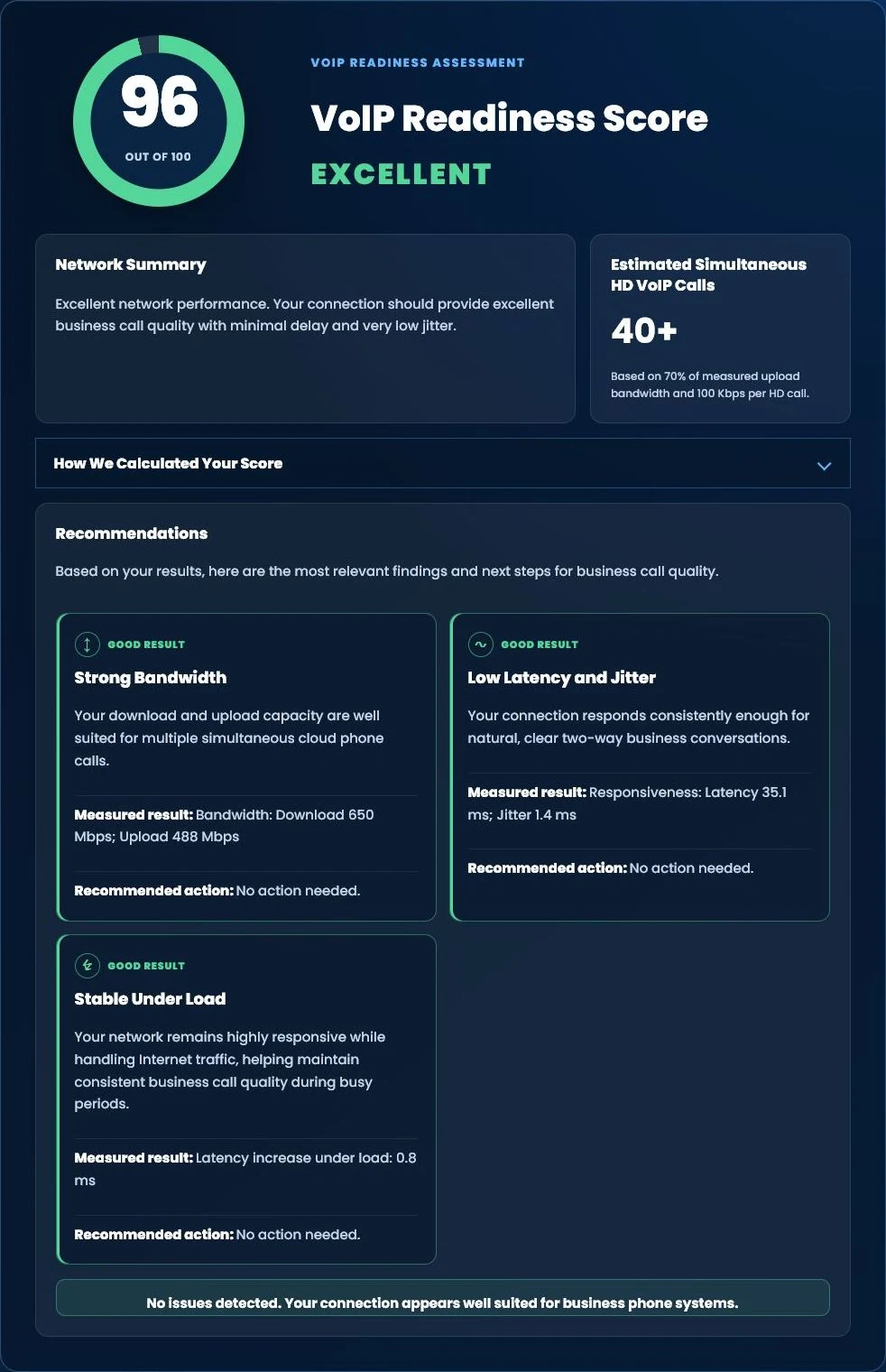
- Use our VoIP jitter and latency test to screen latency, jitter, loaded latency and upload/download performance to Cloudflare. Obtain RTP packet-loss measurements separately from supported call or network diagnostics.
- Repeat the test rather than relying on one sample.
- Compare an idle network with a busy network.
- Review call-quality records from the phone platform when available.
Tier 1’s VoIP Readiness Assessment helps evaluate whether a connection appears suitable for business voice. It is a useful starting point, but intermittent issues may still require longer testing and examination of the actual call path.
The browser result is a snapshot of its test-server path, not a direct measurement of an actual voice call. Keep browser screening results and phone-platform media measurements labeled separately.
FREE BUSINESS RESOURCE
Test Your Internet for Business Phone Systems
Wondering whether your Internet connection is ready for cloud business phones?
Run our free Tier 1 VoIP Readiness Assessment to measure latency, jitter, network responsiveness and overall VoIP readiness in about one minute.
- VoIP Readiness Score
- Latency & Jitter Analysis
- Network Stability Assessment
- Estimated HD Phone Capacity
A Better Troubleshooting Process
Randomly replacing equipment is expensive and often fails to isolate the problem. A structured process works better.
1. Define the scope
Determine:
- One user or everyone?
- One phone, one room or the entire location?
- Wired, wireless or both?
- Incoming, outgoing or all calls?
- One destination or every destination?
- Constant or intermittent?
- One office or multiple locations?
Scope immediately narrows the list of likely causes.
2. Record the time and call
Capture:
- Date and exact time.
- Calling and called numbers.
- Which party heard the problem.
- Device and location.
- Whether the call was on a desk phone, desktop application or mobile app.
- What the user heard.
“Calls were bad yesterday” is difficult to correlate with carrier and network records. A timestamped example can be investigated.
3. Check the endpoint
Inspect the affected phone, headset, cable, switch port or application. Swap one component at a time.
If the problem follows the headset, phone or cable, the wide-area internet connection may not be the cause.
4. Compare wired and wireless
If a wired test is clean and a wireless test is not, investigate the wireless environment before changing the internet plan or phone provider.
5. Test the connection at idle and under load
Look for:
- Latency that rises sharply during uploads.
- Jitter bursts.
- Packet loss.
- Upload saturation.
- A major difference between idle and loaded performance.
If calls become poor only when the network is busy, capacity planning, traffic shaping or QoS may be appropriate.
6. Check network equipment
Review:
- Router and firewall utilization.
- Interface errors and dropped packets.
- Switch-port errors.
- QoS classification and queues.
- Available bandwidth.
- Firmware and stability.
- Whether security inspection is creating a bottleneck.
- Whether SIP ALG or other voice-related handling is interfering with the service.
Do not disable security or change firewall behavior casually. Make controlled changes with a rollback plan.
7. Review platform call metrics
Many business phone systems record call-quality information such as latency, jitter, loss and an estimated Mean Opinion Score.
MOS summarizes perceived or estimated call quality on a scale commonly described from 1, bad, to 5, excellent. It is helpful for comparing calls, but it should not replace the underlying measurements. A single score can hide whether the problem was delay, loss, jitter, the endpoint or a codec change.
8. Escalate with evidence
When contacting the ISP, IT provider or phone provider, include timestamps, affected users, test results and call examples.
Evidence helps the right provider examine the correct segment instead of each vendor blaming another part of the system.
Prepare a Useful Call-Quality Review Brief
| Record | Include |
|---|---|
| Problem and scope | What people hear, affected roles/devices and whether the issue is incoming, outgoing, wired, wireless or location-specific. |
| Timing and impact | When it happens, busiest periods and whether callers must repeat themselves, call back or reach another destination. |
| Browser screening | Test date/time, connection/device, jitter, latency, loaded latency and upload/download values. |
| Actual call evidence | Affected call timestamps and available phone-platform/media metrics, provided later through an agreed support channel. |
| Current environment | Current phone provider, ISP and the person responsible for the business network. |
Start with a non-confidential summary. You do not need to upload customer conversations or sensitive call details in an initial website inquiry. Request a business call-quality review to discuss the evidence and next step.
Common Mistakes Businesses Make
Upgrading internet speed without measuring the problem
More bandwidth can help a saturated connection. It will not automatically fix wireless interference, damaged cabling, excessive latency or an ISP line that intermittently loses packets.
Testing only beside the router
That may prove the ISP handoff is healthy while ignoring the network employees actually use.
Assuming every audio problem is the phone provider
The cloud platform may remain healthy while one office, access point, firewall or endpoint has a problem.
Assuming every problem is the ISP
One-way audio, registration issues or a single malfunctioning device can involve configuration rather than internet quality.
Enabling a generic QoS checkbox
QoS must recognize the correct traffic, operate at the real bottleneck and have accurate bandwidth settings. A checkbox with incorrect assumptions may accomplish very little.
Ignoring upload traffic
Security cameras, backups and cloud synchronization can consume upload capacity. Businesses often focus on download speed even though upload congestion is the source of the call problem.
Relying on one speed test
Intermittent loss and jitter require repeated or continuous observation. One clean result does not disprove a recurring problem.
Build Call Quality Into the Phone-System Design
Call quality should be considered before deployment, not only after users complain.
A complete design should account for:
- Number of simultaneous calls.
- Internet capacity in both directions.
- Router and firewall performance.
- Wired switching and power.
- Wi-Fi coverage and capacity.
- QoS and traffic shaping.
- Voice VLAN requirements.
- Remote and mobile users.
- Secondary internet and failover.
- UPS coverage.
- Monitoring and escalation procedures.
It should also define what happens during an actual outage. Call forwarding and alternate locations may keep new calls moving, but a mobile application connected to the office Wi-Fi will lose internet access when that Wi-Fi’s upstream connection fails.
In that situation, the user may need to turn off Wi-Fi or otherwise switch the phone to working cellular data. The Wi-Fi signal can remain visible even when the Wi-Fi network no longer has internet access.
For a complete continuity plan, see What Happens If the Internet Goes Down?.
Frequently Asked Questions
What matters most for VoIP: speed, latency, jitter or packet loss?
All four matter, but latency, jitter and packet loss often explain poor calls on connections that already have adequate bandwidth. Speed determines capacity. The other measurements help describe whether voice packets arrive consistently and on time.
Is 30 milliseconds of jitter bad?
Under 30 milliseconds is a useful target for business VoIP. Results between 30 and 50 milliseconds should be investigated in context, especially if users report choppy audio. Short bursts and variation over time may matter more than one average.
Is 1% packet loss acceptable for VoIP?
Packet loss should be as close to zero as possible. Less than 1% is a practical screening target, but some calls and codecs may show audible problems before or after that point. Bursts of consecutive loss are especially disruptive. See our dedicated guide to acceptable packet loss for VoIP for testing and troubleshooting steps.
Can QoS fix choppy calls?
QoS can protect voice from competing traffic at a congestion point you control. It cannot repair a bad ISP circuit, weak Wi-Fi, damaged cable, overloaded hardware or loss occurring elsewhere on the internet.
Why do calls break up only when someone uploads a file?
The upload may be saturating the connection and forcing voice packets to wait or be discarded. Check loaded latency, upload utilization, queue behavior and QoS configuration.
Why do mobile-app calls sound worse than desk-phone calls?
The mobile device may be using Wi-Fi with poor coverage, interference, roaming or power-management behavior. A wired desk phone avoids many wireless variables. Compare the same call over stable cellular data and office Wi-Fi to help isolate the path.
Does a passing speed test prove the network is ready for VoIP?
No. It is a useful snapshot. A test should also measure latency, jitter and packet loss, ideally under load and at the time problems occur. The test destination may also be different from the actual voice-service path.
Who should troubleshoot bad VoIP calls?
The phone provider, IT/network provider and ISP may each control part of the path. A provider that understands both voice and business networks can define the scope, collect evidence and direct the issue to the responsible party.
Get a Clearer Answer About Your Network
Poor VoIP quality should not be treated as a mystery or solved by guessing.
Tier 1 Telecom evaluates the complete communications path: internet service, firewall, switching, Wi-Fi, endpoints, traffic patterns, cloud phone configuration and the way your employees actually work.
Start with the free VoIP Readiness Assessment, explore our complete Business Phone Systems guide or review business phone systems for the Treasure Coast.
If your business is already experiencing call-quality problems, request a business call-quality review or call (866) 808-4371.

























