
VoIP does not require an unusually fast internet connection. In most small businesses, the available bandwidth is more than enough to carry the phone calls themselves.
The bigger concern is whether that connection remains stable when employees are uploading files, joining video meetings, using cloud applications, and performing other bandwidth-intensive work.
A connection can produce an impressive speed-test result and still deliver poor voice quality if it has limited upload capacity, high latency, excessive jitter, packet loss, network congestion, or unreliable Wi-Fi.
For a deeper explanation, learn how jitter, latency and packet loss affect VoIP call quality.
This guide explains how much bandwidth VoIP uses, how to estimate your business’s requirements, and which network conditions have the greatest effect on call quality.
The Short Answer
As a conservative planning estimate, allow approximately 100 kilobits per second of upload and download bandwidth for each simultaneous VoIP call.
That means:
- Five simultaneous calls use approximately 0.5 Mbps in each direction.
- Ten simultaneous calls use approximately 1 Mbps in each direction.
- Twenty-five simultaneous calls use approximately 2.5 Mbps in each direction.
- Fifty simultaneous calls use approximately 5 Mbps in each direction.
These figures estimate voice traffic only. Your internet connection must also accommodate cloud applications, email, web browsing, file transfers, security cameras, software updates, backups, video meetings, guest Wi-Fi, and every other service using the network.
A business should therefore avoid choosing an internet plan based solely on the minimum bandwidth required for its calls. The connection needs sufficient unused capacity to handle normal activity and temporary traffic spikes without delaying voice packets.
How Much Bandwidth Does One VoIP Call Use?
The precise amount depends on the codec, packet size, security configuration, network protocol, and phone system.
Cisco documentation indicates that a call may require approximately 55 to 110 kbps in each direction, depending on the phone and codec configuration. Cisco’s more detailed bandwidth calculations show approximately 87.2 kbps for a G.711 call and 31.2 kbps for a compressed G.729 call when the listed Ethernet overhead is included.
Using 100 kbps per call in each direction gives a small business a straightforward planning figure without assuming that every provider uses the same configuration.
The estimate should still be confirmed with the company providing or managing your business phone system.
Estimate Your VoIP Bandwidth Requirement
Use this basic formula:
Maximum simultaneous calls × 100 kbps = estimated voice bandwidth in each direction
The important number is the maximum number of calls occurring at once—not the total number of employees, extensions, devices, or telephone numbers.
| Simultaneous calls | Estimated voice bandwidth in each direction | Planning consideration |
|---|---|---|
| 1 | 0.1 Mbps | Leave additional capacity for overhead and other traffic |
| 5 | 0.5 Mbps | Usually modest, but upload stability still matters |
| 10 | 1.0 Mbps | Check available upload capacity during busy periods |
| 25 | 2.5 Mbps | Traffic prioritization and network design become more important |
| 50 | 5.0 Mbps | Capacity monitoring, failover, and managed networking are advisable |
For example, a company expecting ten simultaneous calls would reserve approximately 1 Mbps of upload capacity and 1 Mbps of download capacity for voice.
That does not mean the company should purchase a 1 Mbps internet connection. It means approximately 1 Mbps of the connection should remain reliably available for calls while the business’s other applications are active.
If you are unsure how many conversations may occur at the same time, see How Many Phone Lines Does My Business Need?.
Why Advertised Download Speed Does Not Tell the Whole Story
Internet plans are usually marketed by their maximum download speed. That number is useful, but it does not provide a complete picture of VoIP readiness.
Voice calls send and receive audio continuously. They depend on:
- Available download bandwidth
- Available upload bandwidth
- Consistent latency
- Low jitter
- Minimal packet loss
- Reliable network equipment
- Proper traffic management
- Adequate Wi-Fi coverage when wireless devices are used
A 500 Mbps connection can still produce choppy calls if its upload channel becomes saturated, the router is overloaded, or voice packets are delayed by large file transfers.
Conversely, a connection with a lower advertised speed may support excellent calls when it is stable, properly configured, and not heavily congested.
Upload Speed May Be the Real Limitation
Many cable and broadband plans are asymmetrical. They provide considerably more download bandwidth than upload bandwidth.
A plan advertised as 500 Mbps, for example, may offer only a fraction of that capacity upstream. Upload capacity is consumed by activities such as:
- Sending cloud backups
- Uploading large files
- Synchronizing shared folders
- Video conferencing
- Streaming security-camera footage
- Sending email attachments
- Publishing content
- Replicating data between locations
VoIP needs bandwidth in both directions. When the upload channel becomes full, callers may hear broken or distorted audio even though the company still has abundant download capacity.
This is one reason a VoIP assessment should examine actual upstream performance instead of relying on the largest number shown in an internet provider’s advertisement.
The Network Conditions That Affect VoIP Quality
Bandwidth determines how much traffic a connection can carry. Call quality also depends on how reliably and consistently voice packets reach their destination.
Latency
Latency is the time required for voice data to travel between the participants.
Excessive latency creates noticeable conversational delay. People may begin talking over one another because each person hears the other slightly later than expected.
A common engineering target is to keep one-way voice latency at or below approximately 150 milliseconds. Higher latency does not always make a call unusable, but the delay becomes increasingly noticeable.
Jitter
Jitter is the variation in packet arrival times.
VoIP audio is divided into small packets that should arrive at regular intervals. When some packets arrive quickly and others arrive late, the audio can sound uneven, robotic, or broken.
A commonly used target for high-quality voice is average one-way jitter below approximately 30 milliseconds.
Packet Loss
Packet loss occurs when data packets fail to reach their destination.
A missing webpage element can often be retransmitted without the user noticing. Real-time voice is less forgiving because a lost audio packet may arrive too late to be useful.
Keeping packet loss below approximately 1% is a common planning target, although lower is better.
These are engineering guidelines rather than universal guarantees. Cisco identifies 150 ms of one-way latency, 30 ms of jitter, and 1% packet loss as not-to-exceed targets for high-quality voice service.
Network Congestion
Congestion occurs when devices attempt to send more data than the network or internet connection can handle at that moment.
The average usage displayed on a monthly report may look reasonable while short bursts of backups, video, downloads, or software updates temporarily overwhelm the connection.
Those brief periods can be enough to affect a live conversation.
Network Equipment
Older routers, unmanaged switches, damaged cabling, incorrect firewall settings, poor Wi-Fi placement, and outdated firmware can all affect VoIP performance.
The internet circuit may be fast enough while the local network remains the source of the problem.
Does QoS Improve VoIP Call Quality?
Quality of Service, commonly called QoS, allows compatible network equipment to identify and prioritize time-sensitive traffic such as voice.
When properly configured, QoS can prevent a large download or file transfer from delaying phone calls on the local network.
QoS is valuable, but it has limits:
- It cannot create additional bandwidth.
- It cannot repair an unstable internet connection.
- It may not control traffic after it leaves your network.
- It requires compatible equipment and proper configuration.
- It cannot compensate for consistently severe packet loss or latency.
QoS works best as part of a well-designed network with adequate capacity. It should not be treated as a substitute for reliable internet service.
Can VoIP Work Over Wi-Fi?
Yes. Softphones, mobile devices, cordless handsets, and laptops routinely place VoIP calls over Wi-Fi.
However, wireless performance varies with signal strength, interference, access-point placement, building materials, channel congestion, and the number of connected devices.
For fixed desk phones, a wired Ethernet connection is often preferred when practical because it removes several wireless variables. Power over Ethernet may also allow compatible switches to provide both network access and electrical power to the phone.
When Wi-Fi is necessary, the business should verify coverage where calls will occur—not just near the wireless access point.
A speed test showing excellent performance in the conference room does not prove that calls will work equally well in a distant office, warehouse, treatment room, or outdoor work area.
What About Remote and Hybrid Employees?
Each remote employee depends on the quality of the network they are using at that location.
The company’s main office can have a properly engineered network while a remote worker experiences poor calls because of:
- Weak home Wi-Fi
- Consumer-grade network equipment
- Competing household traffic
- Limited upload capacity
- Cellular or satellite latency
- An overloaded VPN
- Poor local internet service
Remote users should test their connection from the same location and device they will use for calls. If a VPN is required, the test should also reflect that normal configuration.
Cloud phone systems give employees flexibility, but every location still needs an appropriate connection. For a broader comparison, see Cloud Phone Systems vs. Traditional Phone Systems.
Multi-Location VoIP Requirements
Every location should be evaluated separately.
A strong connection at headquarters does not compensate for a congested branch office. Each site has its own internet service, router, switches, Wi-Fi environment, user count, and calling patterns.
For each location, document:
- The likely number of simultaneous calls
- Available upload and download capacity
- Other applications sharing the connection
- Current router, firewall, switches, and access points
- Wired and wireless coverage
- Backup internet options
- Alternate call-routing requirements
This assessment is especially important before migrating multiple offices or replacing an existing on-premise system. The infrastructure and management differences are covered further in Hosted PBX vs. On-Premise PBX.
Other Business Traffic Must Be Included
Voice may represent only a small portion of the company’s overall internet use.
Common sources of competing traffic include:
- Microsoft 365 and Google Workspace
- Cloud-based customer management systems
- File synchronization
- Online backups
- Video meetings
- Security cameras
- Streaming media
- Guest Wi-Fi
- Remote desktop sessions
- Software downloads and updates
- Business texting and messaging platforms
- AI-powered communication tools
Some of these applications generate short but substantial spikes. Capacity planning should account for busy periods rather than relying only on daily or monthly averages.
Network upgrades, managed equipment, or an additional internet connection may also affect the total project price. These considerations should be included when estimating how much a business phone system costs.
How to Test Whether Your Internet Is Ready for VoIP
A single speed test is only a snapshot. A more useful assessment evaluates the network under conditions that resemble a normal workday.
Test during busy periods
Run tests when employees are actively using cloud software, joining meetings, uploading files, and performing their regular work.
An early-morning test on an empty network may not reveal congestion that occurs in the afternoon.
Use a wired connection first
A wired test helps separate internet-circuit performance from Wi-Fi problems.
If wired performance is stable but wireless results vary, the internet service may be adequate while the Wi-Fi network needs improvement.
Test more than once
Run multiple tests at different times. Look for consistency rather than focusing on the best result.
Measure more than speed
Record:
- Download speed
- Upload speed
- Latency
- Jitter
- Packet loss
Test every location
Evaluate each branch, remote office, and important remote-work environment individually.
Simulate normal traffic
Testing an unused connection does not show how it will perform when the business is active. Where possible, evaluate voice while common applications are running.
Network readiness should be addressed before phones are deployed. See How Long Does It Take to Install a Business Phone System? for the other steps involved in preparing and completing an installation.
What If the Connection Does Not Meet the Requirements?
A failed readiness test does not automatically mean VoIP is unsuitable for the business.
The solution may involve:
- Increasing upload or download capacity
- Replacing an outdated router or firewall
- Installing managed network switches
- Improving Wi-Fi coverage
- Correcting cabling problems
- Separating guest traffic
- Scheduling large backups outside business hours
- Applying appropriate QoS policies
- Adding a secondary internet connection
- Using alternate call-routing arrangements
- Reviewing the design with the phone-system provider
The appropriate fix depends on whether the limitation is the internet circuit, the local network, a specific application, or the building’s wireless environment.
Plan for Internet Interruptions
Even a properly sized connection can experience an outage.
Depending on the phone-system design, calls may be redirected to mobile phones, another office, an answering service, or another destination when the primary location cannot connect. A secondary internet circuit or cellular failover may also help maintain service.
These options improve continuity, but they should not be described as guarantees. Failover behavior depends on the provider, equipment, routing configuration, power availability, and type of interruption.
For the next step, learn what happens to a business phone system when the internet goes down and how to prepare for it.
VoIP Readiness Checklist
| Item | What to verify |
|---|---|
| Concurrent calls | Estimate the maximum number of calls occurring at once |
| Voice bandwidth | Allow about 100 kbps in each direction per simultaneous call |
| Upload capacity | Confirm adequate upstream capacity during busy periods |
| Download capacity | Leave room for voice and other business applications |
| Latency | Target approximately 150 ms one way or less |
| Jitter | Target approximately 30 ms or less |
| Packet loss | Target less than 1%, with lower being better |
| Network equipment | Review the router, firewall, switches, cabling, and access points |
| Traffic prioritization | Determine whether properly configured QoS is appropriate |
| Wi-Fi | Test every area where wireless calling will occur |
| Remote users | Evaluate each employee’s actual calling environment |
| Multiple locations | Assess every site independently |
| Failover | Document backup connectivity and alternate call routing |
| Ongoing monitoring | Recheck performance as users and applications change |
Frequently Asked Questions
A VoIP call commonly uses approximately 55 to 110 kbps of bandwidth in each direction, depending on the codec and configuration. Using 100 kbps per simultaneous call is a practical planning estimate, but the exact requirement should be confirmed with your provider.
For many small businesses, 100 Mbps provides far more bandwidth than voice calls alone require. Whether it is sufficient for the entire business depends on upload speed, simultaneous calls, video meetings, cloud applications, backups, latency, jitter, packet loss, and other network traffic.
VoIP requires both upload and download capacity because every conversation sends and receives audio. On an asymmetrical internet plan, limited upload capacity may affect calls before download bandwidth becomes a concern.
Yes, but performance depends on wireless coverage, interference, congestion, and network design. A wired Ethernet connection is generally preferred for stationary desk phones when practical.
No. QoS can prioritize voice traffic on compatible, properly configured network equipment, but it cannot create bandwidth or repair an unstable internet service. It is one component of a reliable VoIP network.
Test upload speed, download speed, latency, jitter, and packet loss several times during busy working periods. Begin with a wired connection, then test every Wi-Fi area, branch office, and remote environment where calls will occur.
Phones that depend on the affected connection may temporarily lose access to the cloud phone platform. Properly configured alternate routing, mobile applications, another office, or backup internet service may keep calls moving. The exact behavior depends on the system and continuity plan.
Choose the Right Connection and Network Design
Most businesses do not need an exceptionally fast internet plan just to use VoIP. They need a connection with enough upload and download capacity, consistent performance, appropriate network equipment, and room for the rest of their business traffic.
Start with the number of simultaneous calls, reserve approximately 100 kbps in each direction for each conversation, and then evaluate the connection under real working conditions.
Tier 1 Telecom can review your current phone and internet environment, identify possible network limitations, and help determine whether your business is ready for a modern phone system.
FREE BUSINESS RESOURCE
Test Your Internet for Business Phone Systems
Wondering whether your Internet connection is ready for cloud business phones?
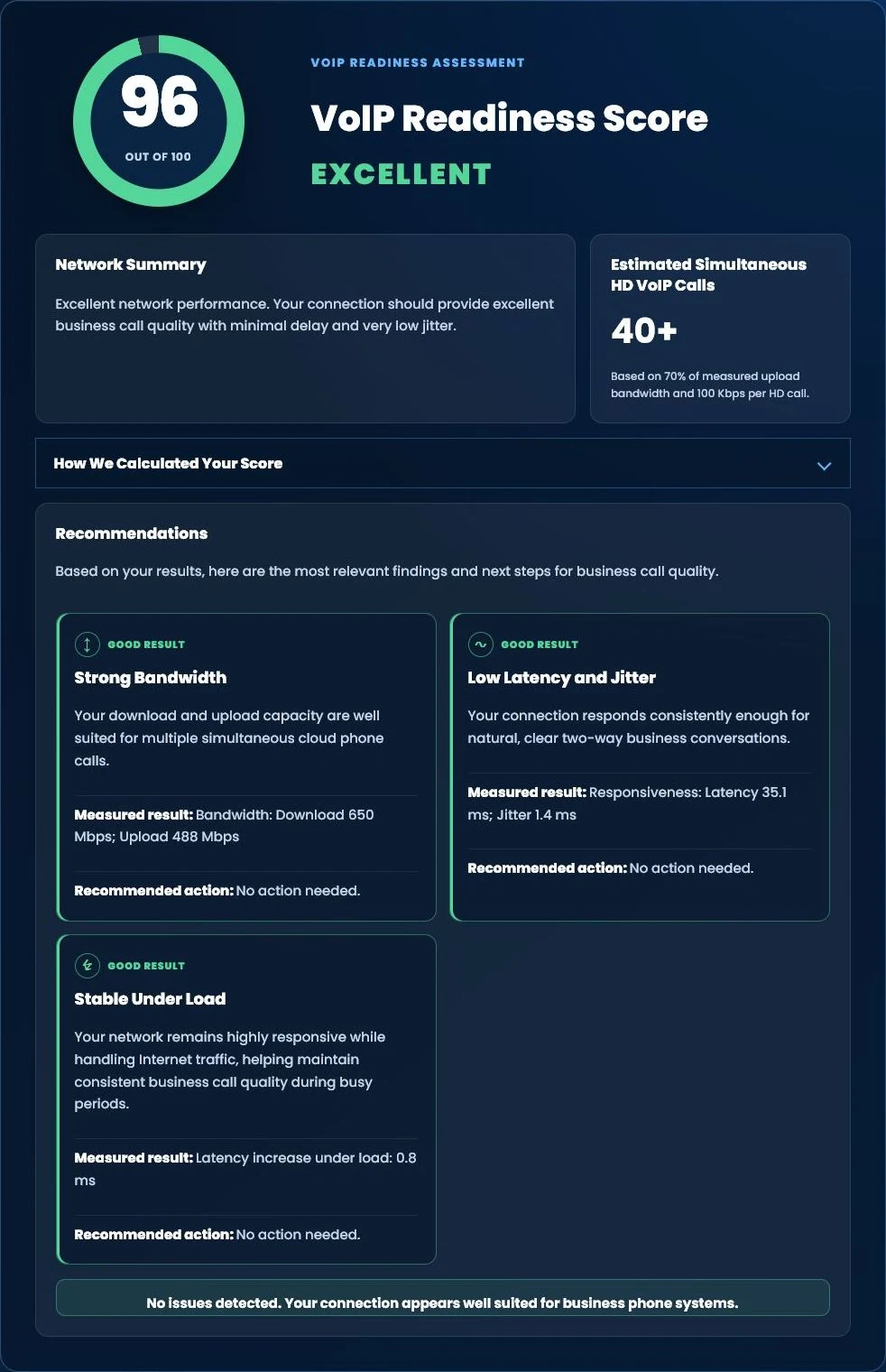
Run our free Tier 1 VoIP Readiness Assessment to measure latency, jitter, network responsiveness and overall VoIP readiness in about one minute.
- VoIP Readiness Score
- Latency & Jitter Analysis
- Network Stability Assessment
- Estimated HD Phone Capacity
FREE BUSINESS PHONE BILL REVIEW
Choose the Right Connection and Network Design
Tier 1 Telecom can review your current phone and internet environment, identify possible network limitations, and help determine whether your business is ready for a modern phone system.
About the Expert
Brad Langel and the Tier 1 Telecom team help businesses evaluate, migrate, and support communications systems based on their operational requirements, locations, calling patterns, and existing infrastructure.

























