
A straightforward cloud business phone system may be prepared within several days or a few weeks.
A larger or more complicated installation can take several weeks or longer.
The actual schedule depends on more than the number of telephones being installed. Planning, account records, network readiness, call routing, equipment availability, employee decisions, number porting, integrations, and testing can all affect the launch date.
The physical phone is usually one of the easiest parts.
The work that takes time is making sure:
- Every number is accounted for
- Every employee has the right configuration
- Calls route correctly
- The network is ready
- Existing services are protected
- Employees understand the new system
- The final cutover is coordinated
- Customer communication continues as expected
A well-managed installation should be measured by how prepared the business is at launch—not simply by how quickly phones can be placed on desks.
The Short Answer
A practical planning range is:
| Installation type | General planning range | Common characteristics |
|---|---|---|
| Small, straightforward cloud system | Several days to approximately two weeks | Few users, one location, simple routing, accurate account records and readily available equipment |
| Typical small or midsized business | Approximately two to four weeks | Multiple departments, number porting, mobile apps, queues, schedules, voicemail and employee training |
| Multi-location or complex installation | Four to eight weeks or longer | Multiple carriers, many numbers, complex routing, integrations, specialty services, network work or coordinated locations |
These are planning estimates—not guaranteed completion times.
Some phases can happen simultaneously. The new system can often be designed, configured, staged, and tested while the number transfer is being processed.
The final launch date should not be promised until the required information is available, the system is prepared, and any number-porting schedule has been accepted.
What Does “Installing a Phone System” Include?
Installation involves much more than connecting desk phones.
A complete project may include:
- Reviewing the current phone bill
- Inventorying every telephone number
- Identifying users and devices
- Mapping call flows
- Designing auto attendants
- Configuring queues and ring groups
- Setting business hours and holidays
- Preparing voicemail
- Configuring caller ID
- Reviewing emergency-service addresses
- Checking the internet connection and network
- Ordering or reusing compatible equipment
- Configuring mobile and desktop applications
- Preparing business texting
- Connecting supported integrations
- Configuring optional AI voice agents
- Training employees
- Submitting number-port requests
- Testing the complete system
- Coordinating final cutover
- Providing post-launch support
Skipping these steps may produce a faster installation on paper, but it can create more problems after launch.
Phase 1: Review the Current Environment
The first step is understanding what the business already has.
Review:
- Current providers
- Phone bills
- Contracts and renewal dates
- Main and direct numbers
- Toll-free numbers
- Fax numbers
- Text-enabled numbers
- Equipment
- Users and extensions
- Departments
- Locations
- Current routing
- Queues
- Voicemail boxes
- Internet connections
- Network equipment
- Specialty lines
- Existing integrations
This review can be quick when the business has organized records and one provider.
It takes longer when services are spread across multiple bills, former providers, locations, or accounts that nobody currently manages.
A free business phone bill review can help establish the starting point before a recommendation is prepared.
Phase 2: Design the New Call Flow
A new phone system should not automatically duplicate every frustration in the old one.
This is an opportunity to decide how calls should work now.
Questions include:
- What should callers hear first?
- Should reception answer before an auto attendant?
- Which departments need menu options?
- Who belongs in each ring group or queue?
- What happens when nobody answers?
- How should calls route during lunch?
- What happens after hours?
- Which calls go to on-call employees?
- Which employees need direct numbers?
- Who uses desk phones, mobile apps, or desktop apps?
- Which calls should reach another location?
- Where should voicemail be delivered?
- Is business texting required?
- Are there defined uses for an AI voice agent?
A simple office may make these decisions in one meeting.
A larger company may require input from managers, departments, locations, compliance personnel, or ownership before the design can be approved.
The available options are covered further in What Features Should a Business Phone System Have?.
Phase 3: Inventory Users, Numbers, and Devices
The provider needs an accurate list of who and what will use the system.
Users
For each employee, identify:
- Name
- Role
- Extension
- Direct number
- Calling permissions
- Voicemail requirements
- Queue membership
- Mobile-app access
- Desktop-app access
- Business-texting access
- Reporting or administrative access
Telephone numbers
Document:
- Main business number
- Direct-dial numbers
- Department numbers
- Toll-free numbers
- Fax numbers
- Text-enabled numbers
- Tracking numbers
- Numbers connected to equipment
- Numbers that may no longer be required
Devices
Determine which users or areas need:
- Desk phones
- Reception phones
- Conference phones
- Cordless phones
- Headsets
- Mobile apps
- Desktop applications
- Shared or common-area devices
This inventory also helps determine how many phone lines, users, and call paths the business needs.
Incomplete inventories frequently cause last-minute additions, equipment changes, and delayed approvals.
Phase 4: Check Network Readiness
A cloud phone system depends on the internet connection and local network carrying the calls.
The review may include:
- Internet stability
- Available bandwidth
- Latency
- Jitter
- Packet loss
- Routers
- Firewalls
- Network switches
- Power over Ethernet
- Cabling
- Wi-Fi
- Virtual LAN configuration
- Quality-of-service settings
- Power protection
- Remote-employee connections
- Alternate internet or routing plans
Speed is only one part of the review.
A fast internet connection can still produce poor calls if the local network is unstable, overloaded, incorrectly configured, or using unsuitable equipment.
If network changes are needed, they should be identified before the final phone-system launch. Waiting until installation day to discover missing cabling or unsupported switches can delay the project.
Phase 5: Configure the Cloud Phone System
Once the design is approved, the provider can begin building the system.
Configuration may include:
- Users
- Extensions
- Devices
- Auto attendants
- Ring groups
- Queues
- Business hours
- Holiday schedules
- Voicemail boxes
- Voicemail-to-email
- Caller ID
- Music or announcements
- Call recording where approved
- Mobile and desktop applications
- Department permissions
- Reporting access
- Emergency-service addresses
- Alternate routing
- Business texting
- Supported integrations
- Optional AI voice workflows
This work can often be completed before the existing numbers move.
Temporary test numbers allow the provider and customer to call into the new system and confirm that menus, transfers, voicemail, queues, applications, and devices behave correctly.
Phase 6: Prepare and Stage the Equipment
Desk phones and other devices should be configured before employees rely on them.
Staging may include:
- Applying current firmware
- Assigning devices to users
- Configuring extension information
- Testing buttons and displays
- Confirming headsets
- Labeling equipment
- Preparing power adapters where required
- Testing network connectivity
- Packaging phones by employee or location
- Recording device serial numbers
- Preparing installation instructions
Preconfigured equipment can often be connected on-site with much less disruption than phones programmed one at a time after arrival.
Equipment availability can affect the schedule. Specific phone models, conference devices, cordless systems, headsets, or network hardware may need to be ordered.
Phase 7: Test Before Launch
Testing should occur before the established business numbers are transferred.
Verify:
- Inbound calling
- Outbound calling
- Outbound caller ID
- Main-number routing
- Direct numbers
- Auto-attendant options
- Ring groups
- Queues
- Transfers
- Hold
- Voicemail
- Voicemail-to-email
- Business-hour routing
- After-hours routing
- Holiday schedules
- Mobile applications
- Desktop applications
- Conference devices
- External forwarding
- Alternate destinations
- Recording where approved
- Supported integrations
- Emergency-service information
Testing should include the workflows employees actually use—not merely one successful call to a desk phone. It should also test internet failover and recovery before launch so alternate routing is understood before the system is needed.
Phase 8: Train Employees
Even a well-designed system can create frustration when employees do not know how to use it.
Training may cover:
- Making and receiving calls
- Holding and transferring
- Parking calls
- Accessing voicemail
- Using mobile and desktop apps
- Changing availability
- Signing into queues
- Starting conference calls
- Sending approved business messages
- Using headsets
- Escalating technical problems
Receptionists, managers, administrators, and queue supervisors may require additional training beyond everyday users.
Training should be relevant to each role. Employees do not need to learn every available feature before launch.
Phase 9: Port the Existing Phone Numbers
Number porting often controls the final launch date.
The new provider may need:
- Recent telephone bill
- Legal business name
- Service address
- Account number
- Billing telephone number
- Account or porting PIN
- Complete number list
- Customer Service Record
- Signed Letter of Authorization
- Authorized contact
Incorrect or mismatched information can cause a rejection and delay.
Keep the current service active until the transfer has completed and every number has been tested.
See what happens during the final number-porting and cutover stage, including carrier routing and call-flow verification.
The complete process is explained in Can I Keep My Existing Phone Numbers?.
Phase 10: Coordinate the Final Cutover
The cutover is when established numbers begin routing to the new system.
A launch plan should identify:
- Expected date and window
- Employees responsible for testing
- Provider escalation contacts
- Numbers being transferred
- Services remaining with the old provider
- Devices and applications being activated
- Tests performed immediately after cutover
- Alternate routing if a problem occurs
- Employee communication
- Customer-impact considerations
Test calls should be made from different networks and carriers when practical.
Confirm:
- Main number
- Direct numbers
- Toll-free numbers
- Fax workflow
- Inbound routing
- Outbound caller ID
- Voicemail
- Queues
- Mobile and desktop applications
- After-hours handling
- Emergency-service information
- Texting when separately approved and active
Do not cancel the old account merely because one successful test call was completed. Verify the full number and service inventory first.
What Can Make Installation Faster?
A project generally moves more efficiently when the business provides:
- One authorized decision-maker
- Current telephone bills
- Accurate account information
- Complete number inventory
- User and device list
- Approved call-flow decisions
- Current business hours and holiday schedule
- Correct service addresses
- Prompt equipment choices
- Available network information
- Timely document signatures
- Employees for testing and training
It also helps to avoid making unrelated changes to the current carrier account while a port request is pending.
Open orders, address changes, number changes, freezes, or service modifications can complicate the transfer.
What Can Delay Installation?
Common causes include:
- Missing or inaccurate bills
- Incorrect account information
- Undocumented telephone numbers
- Porting rejections
- Account freezes
- Pending carrier orders
- Contract or ownership questions
- Delayed call-flow decisions
- Equipment backorders
- Unsupported existing phones
- Network upgrades
- Cabling requirements
- Multiple locations
- Specialty services
- Complex queues
- Custom integrations
- Messaging registration
- Employee scheduling
- Last-minute scope changes
The provider should identify which steps control the schedule and which can proceed in parallel.
Typical Installation Scenarios
Small professional office
A small office with one location, a few users, one main number, simple routing, and an existing stable network may be prepared relatively quickly.
The primary schedule considerations are usually:
- User information
- Phone selection
- Basic call flow
- Equipment delivery
- Number-port acceptance
- Employee availability for testing
Growing service company
A contractor or home-service company may need:
- Office phones
- Dispatch users
- Mobile applications
- Business texting
- Queues
- On-call routing
- After-hours coverage
- Several direct numbers
The system may be configured quickly, but routing decisions, texting preparation, employee roles, and number transfers can add time.
Professional or regulated office
A medical, legal, financial, or other privacy-sensitive office may need additional review of:
- Call recording
- User access
- Voicemail delivery
- Retention
- Integrations
- Administrative permissions
- After-hours workflows
- Data handling
The availability of a feature does not establish that it is suitable for every regulated workflow.
Multi-location business
A multi-location project may require:
- Separate network reviews
- Location-specific schedules
- Centralized routing
- Local numbers
- Shared queues
- Extension dialing
- Equipment shipping
- Employee coordination
- Multiple cutover plans
Some locations may launch together, while others may require a phased implementation.
Should Every Business Launch at Once?
Not necessarily.
A phased rollout may be appropriate when:
- There are several locations
- One department has unique requirements
- The business operates around the clock
- Network work is incomplete
- Different carriers control different numbers
- Employee groups need separate training
- Integrations require additional testing
- A pilot group can validate the workflow first
A phased rollout can reduce the number of changes happening simultaneously, but it requires careful routing between the old and new systems.
The best approach depends on the business’s operating schedule and dependencies.
Cloud vs. On-Premise Installation Time
Cloud phone systems generally require less on-site PBX hardware because the communications platform is hosted by the provider.
This can simplify:
- System provisioning
- User creation
- Remote configuration
- Application deployment
- Feature updates
- Adding employees
- Connecting locations
An on-premise PBX may require:
- Server or appliance installation
- Equipment-room preparation
- Additional hardware
- On-site software configuration
- Local backups
- Maintenance planning
- Capacity planning
- More extensive local technical work
The difference is examined in Hosted PBX vs. On-Premise PBX.
Neither approach should be selected solely because it appears faster to install. Long-term management, reliability, control, cost, and business requirements also matter.
Business Texting and Integrations May Follow a Separate Schedule
Voice calling may be ready before every related service is complete.
Business texting may require:
- Number enablement
- Brand registration
- Campaign approval
- Toll-free verification
- Consent language
- Privacy and terms pages
- Opt-out handling
- Platform configuration
Supported CRM, scheduling, help-desk, or workflow integrations may also require separate credentials, testing, field mapping, and employee training.
The phone-system launch should identify which capabilities are available immediately and which will be activated later.
Installation Planning Checklist
| Planning area | Information to prepare | Why it matters |
|---|---|---|
| Current services | Bills, providers, contracts, numbers and equipment | Establishes the complete starting point |
| Users | Employees, roles, extensions, devices and permissions | Determines licenses and configuration |
| Call flow | Menus, queues, schedules, voicemail and overflow | Defines the customer experience |
| Network | Internet, switches, firewall, Wi-Fi, power and cabling | Supports call quality and device connectivity |
| Equipment | Phones, headsets, conference devices and compatible hardware | Prevents device-related launch delays |
| Porting | Account records, authorization, number list and requested schedule | Controls transfer of established numbers |
| Testing | Inbound, outbound, routing, apps, voicemail and failover | Identifies problems before launch |
| Training | Employees, administrators, reception and supervisors | Helps users adopt the system |
| Cutover | Date, contacts, tests, escalation and alternate routing | Coordinates the final transition |
Network readiness can affect the installation schedule, so review the internet speed and call-quality conditions VoIP requires during planning.
Frequently Asked Questions
A straightforward cloud installation may be prepared within several days or approximately two weeks when account records, decisions, network conditions, equipment, and number-porting requirements are uncomplicated. The actual schedule should be confirmed for the specific project.
Yes. Users, devices, menus, queues, voicemail, schedules, applications, and many other settings can often be configured and tested using temporary numbers before the final port.
Not necessarily. User count matters, but network readiness, call-flow complexity, number porting, equipment availability, locations, integrations, and decision-making may affect the schedule more than the physical number of phones.
It should remain active while the new system is prepared and until the approved number transfer is completed. Do not cancel the existing service before every number and dependency has been verified.
Some cutover work can be scheduled outside normal hours, depending on carrier timing, employee availability, building access, provider support, and project requirements. An after-hours schedule does not eliminate the need for preparation and testing.
Common delays include incorrect carrier records, port rejections, incomplete number inventories, network work, equipment availability, undecided call routing, custom integrations, specialty services, and last-minute scope changes.
Possibly. Existing IP phones may be reusable if their models, firmware, condition, ownership, configuration, and platform compatibility are acceptable. Compatibility should be verified before the installation plan is finalized.
A Smooth Installation Starts Before Launch Day
The best business phone installations are carefully prepared before the first public call reaches the new system.
A controlled project should:
- Review the current environment
- Document every number
- Identify users and devices
- Design the call flow
- Prepare the network
- Configure the platform
- Stage the equipment
- Test real workflows
- Train employees
- Coordinate number porting
- Validate the final cutover
- Provide post-launch support
Moving quickly is valuable.
Moving quickly without understanding the numbers, network, users, and customer workflow creates avoidable risk.
FREE BUSINESS RESOURCE
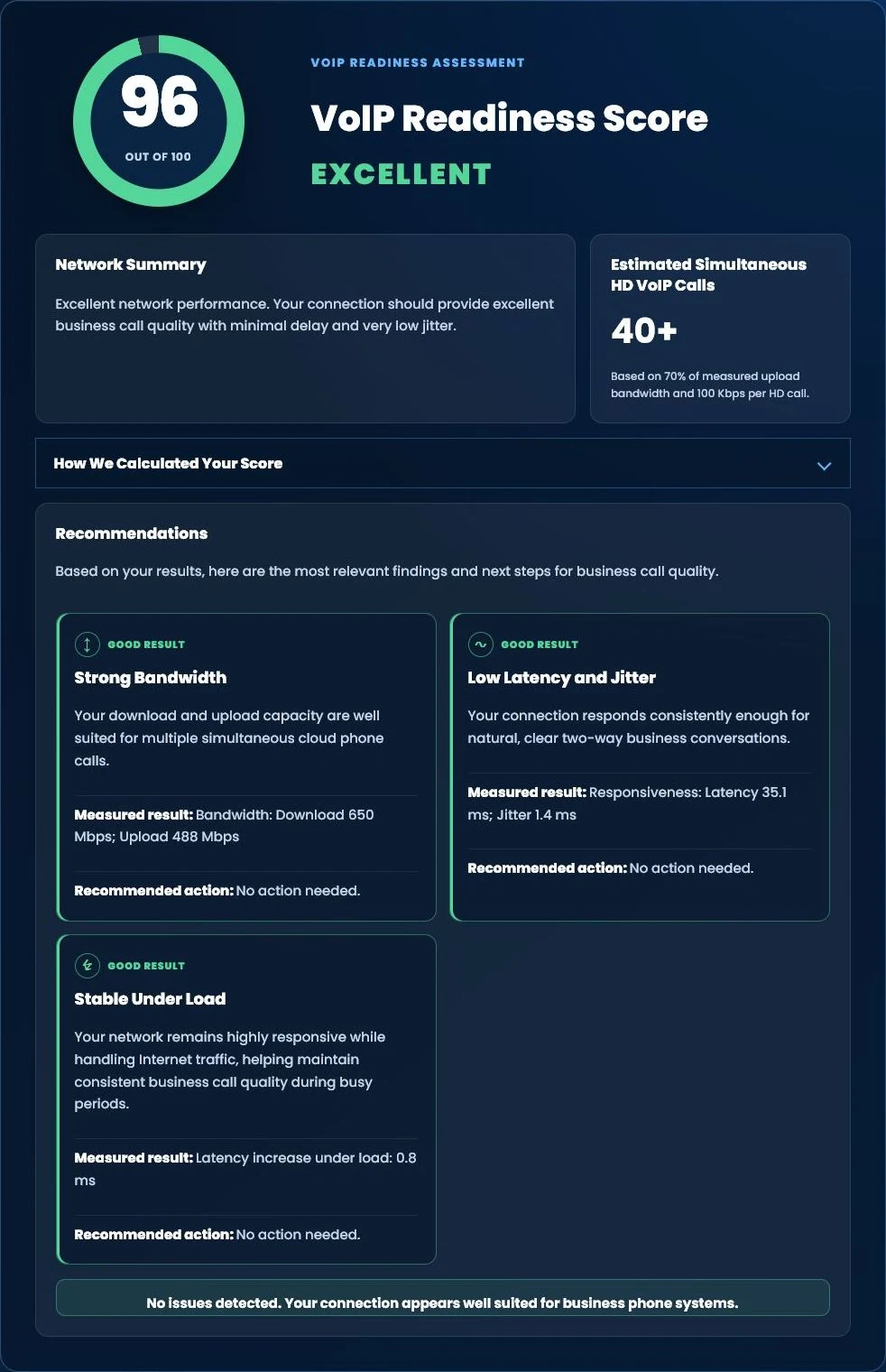
Test Your Internet for Business Phone Systems
Wondering whether your Internet connection is ready for cloud business phones?
Run our free Tier 1 VoIP Readiness Assessment to measure latency, jitter, network responsiveness and overall VoIP readiness in about one minute.
- VoIP Readiness Score
- Latency & Jitter Analysis
- Network Stability Assessment
- Estimated HD Phone Capacity
FREE BUSINESS PHONE BILL REVIEW
Not Sure What Your Installation Would Require?
Tier 1 Telecom can review your telephone bill, users, numbers, equipment, call flow, network considerations, and known dependencies before recommending an implementation plan. There is no obligation to switch.

























